Showing posts with label Accessibility. Show all posts

Tuesday, November 21, 2023

Live Captions in Chrome

Chrome now offers live captions, it can automatically generate real-time captions directly in the browser. With a couple of quick settings adjustments you can automatically create captions for audio and video.

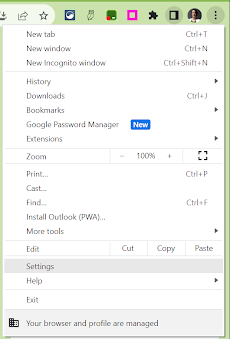
In the Chrome browser, go to the 3-dots menu in the top right corner.


Find ‘Settings’ in the dropdown menu.


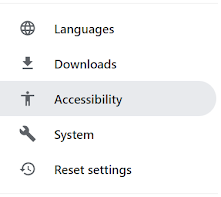
In the menu on the left, open Accessibility.


Toggle on ‘Live Caption’.


You can select a preferred language (from a very short, very limited list), delete a caption language from your account and choose to ‘Hide profanity’ in the settings.

Tuesday, November 14, 2023

Reading Mode in Chrome

Reading mode in Chrome browser is now available on all Chromebooks.  Customize your reading experience with reading mode.  It allows you to more easily focus on the text, reduce distractions from images and videos, adjust the font and size, the spacing and the background color for any article or webpage you are reading.


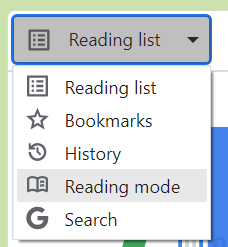
To access Reading mode, open the reading list icon in the extensions bar.


On the dropdown that says ‘reading list’ select ‘reading mode’.


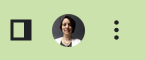
Adjust the size of the reading window using the 2 vertical, parallel lines on the left.


Adjust, from a limited set of options, the font style, size, spacing and background color.


Tuesday, April 25, 2023

Closed Captioning in Google Slides

Google Slides offers a Closed Captions option.  This can be used to help anyone read what is being said by the presenter or what is being said during a presentation video.  

If the microphone is good enough it will also pick up any questions asked by audience members.  

Closed Captioning in Google Slides can be added to the top or the bottom of the presentation.  Adding the captioning to the top could be used in other ways as well.  Think about having a presentation open and running above a video that doesn't have closed captioning available.  

To use Closed Captions in Google Slides check out this easy to follow tutorial.

Google Slides - Closed Captions (https://bit.ly/43Q2YMg)

Tuesday, February 7, 2023

Rewordify.com

Have you ever read a text, even reread the text and you still have no idea what you read. Some of our students experience this everyday.

Rewordify.com can help both you and your students!

To use Rewordify simply enter hard sentences into the yellow box, click 'Rewordify text' and you'll instantly see an easier version.  Rewordify even highlights the words it changed and with a simple click, helps you learn the original word. 

Check out Rewordify.com for yourself.  I know you (and your students) will love it!

Tuesday, January 31, 2023

Postlight Reader

Postlight Reader is a Google Extension that allows you to remove webpage noise and clutter from an article to make it easier for students to read.  

Mercury Reader Extension - Off          Mercury Reader Extension -On

Postlight Reader allows you to make minor changes to font style, size and light/dark background options.  

Mercury Reader Extension - Settings icon     Mercury Reader Extension - Settings Menu

Not only is this extension great for students, teachers can also use it for clearing out the clutter on articles that need to be printed or shared with others.  

Tuesday, January 24, 2023

Keyboard Shortcuts for Chromebooks

Keyboard shortcuts make my life so much easier.  I love them.  

I found a great article that lists some great keyboard shortcuts for Chromebooks. 
Check out KEYBOARD SHORTCUTS FOR KIDS (https://www.coderkids.com/blog/keyboard-shortcuts-for-kids) from CoderKids

Tuesday, December 13, 2022

SignUp Captioning

Do you know some who is hearing impaired and could use sign language when watching shows and movies?
Are you trying to learn or improve your sign language skills?

The SignUp Google Chrome Extension overlays sign language (both American and British) interpretation on streaming platforms, such as Disney+ and Netflix, for more accessible captioning.

To learn about SignUp visit their website at https://www.signupcaptions.com/

Tuesday, December 6, 2022

Google Slides: Closed Captions

Google Slides offers a Closed Captions option.  This can help anyone read what is being said by the presenter.  If the microphone is good enough it will also pick up any questions asked by audience members.  

To use Closed Captions in Google Slides check out this easy to follow tutorial.

Google Slides - Closed Captions

Tuesday, November 22, 2022

Add a Quick Access World Language Keyboard on an iPad

Do you have students in you classroom in which English is not his/her first language?

You can update the settings on an iPad to a variety of world languages, allowing students to type on the keyboard in his/her native language.

Follow this tutorial to Add a Quick Access World Language Keyboard on an iPad.

Tuesday, November 15, 2022

Add a Quick Access World Language Keyboard on a Chromebook

Do you have students in you classroom in which English is not his/her first language?

You can update the settings on a Chromebook to a variety of world languages, allowing students to type on the keyboard in his/her native language.

Follow this tutorial to Add a Quick Access World Language Keyboard on a Chromebook.

Tuesday, November 8, 2022

Enabling and Using Dictation

 Take a moment to consider your students. 

Think about the ones who struggle to get their ideas onto paper. How about the students who struggle with spelling or have fine motor control issues.  Do you have students in which English is not their first language?


Speech to Text is a tool that can help these students and many others. It is an Accessibility feature built into most devices today. Speech to Text is a tool that allows a writer to dictate their thoughts and ideas into a document. 


Speech to Text, also known as Dictation, is available on Chromebooks and iPads.  To enable and use dictation on these devices follow the instructions in the tutorials below.


Enabling and Using Dictation on a Chromebook (http://bit.ly/3GobetQ)


Enabling and Using Dictation on an iPad (http://bit.ly/3MntMLC)


Give it a try! Your students will love it (and so will you)!


Tuesday, November 1, 2022

Enabling and Using Text to Speech

Text to Speech is a tool that has multiple uses. It can be used to help with reading and writing.  It can be a useful tool for struggling readers, English language learners, and readers with dyslexia as well. It can be used by students and teachers. Text to Speech is an available accessibility feature on both iPads and Chromebooks. Attached below are tutorials on how to enable and use them on these devices.

Enabling and Using Select-to-Speak on a Chromebook 
(https://bit.ly/3tkSaEI)

Enable Speak Selection on an iPad   (https://bit.ly/iPadSpeakSelection)

Tuesday, May 24, 2022

Visual Recipes

Are you looking for a fun, end of the year activity to do with your students? 
Have you thought about cooking with your class? 
Everyone can create delicious food with picture recipes.  Picture recipes are great for all ages and abilities because they don't rely on reading abilities. 
Check out these great recipe options from Able2Learn: https://able2learn.com/categories/visual-recipes

Tuesday, May 17, 2022

Tar Heel Gameplay

Tar Heel Gameplay (https://tarheelgameplay.org/) is a collection of free, easy-to-play, and accessible games. Each game is speech enabled and may be accessed using multiple interfaces, including touch screens and up to 3 switches.

Tuesday, April 26, 2022

Free Teen Audiobooks

Sora by Overdrive has paired with SYNC to offer 16 weeks of Free Audiobooks aimed at teens 13+!

You can download 2 FREE audiobooks each week, starting April 28th and running through August 17th!
 
Register and sign up for e-mail reminders or text reminders at http://www.audiobooksync.com/.

Check out the SUMMER 2022 SYNC TITLE PAIRINGS (https://bit.ly/3K0cZf1) page for the list of available books this summer.


Tuesday, April 12, 2022

Free to anyone books in Bookshare

Bookshare.org is a program that makes reading easier. People with dyslexia, blindness, cerebral palsy, and other reading barriers can customize their experience to suit their learning style and find virtually any book they need for school, work, or the joy of reading.

Although Bookshare is designed for students with reading struggles, it has over 10,000 freely available books published under the public domain or creative commons license. These books can be read by anyone and are useful for conducting demonstrations and trainings. check out the free book at the links below.

Demo Books - https://www.bookshare.org/browse/collection/353677

Ebook Sources - https://www.bookshare.org/cms/help-center/learning-center/learning-at-home/more-ebooks

Tuesday, March 29, 2022

Knowt

Knowt (https://knowt.io/) allows you to make flashcards and quizzes directly from your class notes. Teachers can use this to make class assignments and students can use it to study for tests.

You can also search for other people's notes on the same subject area. They are continuously working to add notes based on school textbooks. Students can apply to become a KnowtTaker and earn volunteer hours for writing notes that students around the world can study from.  Teachers can get paid for writing notes for Knowt.

Knowt was created by 3 high school kids who were bored with regular note taking. All three now all attend MIT.

Teachers can share notes with students via Google Classroom as well.

Did you zone out during the lecture? Did you miss something the teacher said? Was the teacher talking too fast, you couldn't keep up? You can use Knowt to immediately check to see if your class notes make sense. If the quiz doesn't make any sense you may have missed some important information. Re-read you notes and fill in what you remember or talk with a classmate or your teacher to fill it in.

Tuesday, February 22, 2022

whiteboard.chat

Would you like to collaborate with your students, using an online whiteboard?

Whiteboard.chat is a free interactive online whiteboard for teachers and students to collaborate digitally.  You can easily observe all of your students, on individual whiteboards or demonstrate something to the whole class on a single board.  

Although it is free for educators, there are some limitations.  You can have up to 10 class boards.  If you don't touch a board for 7 days, it will be deleted.

Whether you are creating individual student boards or one class board, inviting student is as easy as sharing the board specific code.  

Although it takes a little exploring to figure out how to navigate at first, there are some really COOL features in whiteboard.chat! 

Do you want to show your kids how to break down money, give change?

Open a new board.  

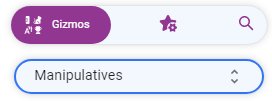
On the right open Gizmos: 


In the menu find US Currency:


Add some different denominations of money to the board.

On the left go to Tools, Break Down:

With the crosshairs, click on any of the bills or coins (larger than a penny) you added!
Tuesday, February 15, 2022

Pattern Shapes

Pattern Shapes helps students explore geometry. It helps students think about angles, investigate symmetry, and compose and decompose larger shapes.

Pattern Shapes is a virtual version of the 7 familiar classroom shapes
yellow hexagons, orange squares, green triangles, red trapezoids, blue parallelograms, and tan rhombuses

Check out their great tutorials (https://bit.ly/36kEF0i).

Number Line is available as a
web app (https://bit.ly/3IrYdNA), for iOS (https://apple.co/3ubFUqN), or for Chrome (https://bit.ly/3N1vMt8).

Tuesday, February 8, 2022

Money Pieces

Money Pieces helps students visualize and understand its values and relationships. There are two versions of coins and bills in the app. The currency pieces mimick the appearance and size of U.S. coins and the dollar bill.

Check out their great tutorials (https://bit.ly/3uyacG2).

Money Pieces is available as a web link (https://bit.ly/3gtgGxt), iOS app (https://apple.co/3uBxXNh), or for Google Chrome (https://bit.ly/3GAbbI6).