Showing posts with label Listening. Show all posts

Tuesday, January 23, 2024

World Read Aloud Day


World Read Aloud Day is a day dedicated to the art of reading aloud. It is celebrated on the first Wednesday in February.  Multiple vendors and book companies provide a variety of activities to celebrate. Mark your calendars for February 7th, 2024, and get ready for a day full of excitement as we celebrate the joy of reading aloud. 


One of the great companies that will be participating in World Read Aloud Day is Curipod!  They will have a new author every 30 minutes, including a live Q & A session with each author.  Each registered classroom will get a 70-page activity packet from Curipod.  The packet includes amazing interactive, engaging lesson plans and activities, downloadable activity books, coloring pages, turnkey Curipod lessons, Genially activities and so much more!


Don't miss out on this incredible opportunity! Register your classroom now to ensure you and your students don't miss out on the literary adventure of a lifetime. Even if you can't attend, registering to receive the student activity guide is worth it! 


Register with Curipod for WRADLive at https://wradlive.com/.


Tuesday, November 28, 2023

Formative

Although I usually provide tools or tricks more focused on student use and success, this one is great for teachers.

Formative is a tool that provides teachers with tools to engage, instruct, and assess their students. 

Just a few of the things you can do with Formative include transforming a PDF or Google Doc into an auto-graded quiz,  enhancing reading passages with questions, promoting higher-level thinking with advanced Math tools, and unleashing student creativity with the option of audio and video responses.

Check out Formative for yourself. 

Tuesday, November 21, 2023

Live Captions in Chrome

Chrome now offers live captions, it can automatically generate real-time captions directly in the browser. With a couple of quick settings adjustments you can automatically create captions for audio and video.

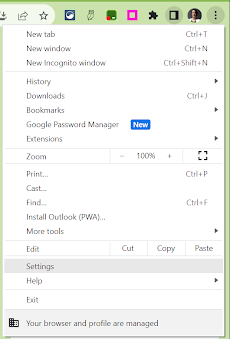
In the Chrome browser, go to the 3-dots menu in the top right corner.


Find ‘Settings’ in the dropdown menu.


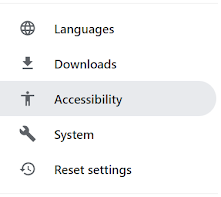
In the menu on the left, open Accessibility.


Toggle on ‘Live Caption’.


You can select a preferred language (from a very short, very limited list), delete a caption language from your account and choose to ‘Hide profanity’ in the settings.

Tuesday, March 21, 2023

Presentation Skills Toolkit

Learning presentation skills has been identified as essential for building one’s capacity to plan, facilitate, and share any content in oral presentation form.

The REMC Association of Michigan has great resources teachers can use to help build these skills within their students, during classroom lessons.

PRESENTATION SKILLS TOOLKIT (https://www.remc.org/classroom-resources/presentation-skills-toolkit/)

This REMC toolkit offers students and educators learning resources, reflection points, and exercises to improve presentation techniques, for all grades and ages.  There are lessons available in 5 different categories: collaborator, audience-centric design, establishing credibility & purpose, and presenting with clarity & confidence.  

Tuesday, March 7, 2023

Promoting STEM Through Literature

REMC has another great resource that I would like to highlight this week:

Promoting STEM Through Literature

Literature can be a great way to get students excited about science, technology, engineering, and math (STEM).  Educators can use literature to get students actively involved in the design thinking process. 

Each of the title shared on the website has a book card/lesson plan that includes a maker-STEM connection; pre, during, and post questions; and a design challenge that incorporates materials you could check out from your local REMC library.  You can also check out each of the books from your local REMC library.  

This year there will be 3 new books announced at the MACUL conference in Detroit, in March.  


Tuesday, May 3, 2022

Apple Live Listen

Have you ever had a hard time having a conversation in a noisy environment?

With Live Listen (https://apple.co/3Nnnj2U) by Apple, you can use your iPad and AirPods to magnify the sound of the person you are talking with.

Live Listen allows sound captured by an iPad to be magnified and sent wirelessly to AirPods or Beats headphones (https://support.apple.com/en-us/HT2a09082). In a classroom setting, students can use this feature to hear a teacher louder from a distance.