Do you have students that struggle with large projects or to-do lists? Do you sometimes struggle with where to start on a task?
Goblin Tools can compile my brain-dump into a list of tasks or help tame the challenge of large tasks or assignments, especially for our neurodivergent students. This is a free online suite of AI-powered mini-apps designed to conquer chaos and boost productivity.
With Goblin Tools you can break big tasks down into manageable steps with 'Magic To Do" or estimate how long a a task might take with 'Estimator'. Do you need help verifying the tone of someones writing or does your writing need to be more formal? Check out 'The Judge' or 'Formalizer'.
Goblin Tools helps you get organized and achieve your goals, one bite-sized chunk at a time.
Showing posts with label Behavior. Show all posts
Showing posts with label Behavior. Show all posts
Tuesday, May 14, 2024

Tuesday, February 6, 2024
Diffit
If you work in any classroom, differentiating instruction can be a large part of your day. There is a new generative AI program that can help you with this task, Diffit.
Diffit lets you create differentiated resources from your exiting materials or from scratch. You can use Diffit to relevel text, customize vocabulary, translate, and mero.
Sign up for you (currently) free account today.
Tuesday, January 30, 2024
MagicSchool AI
Another new school-based generative AI program you might want to check out is Magic School AI.
This tool is designed specifically for educators. It has over 60 AI tools that can be used for things like composing professional emails to leveling or ordering text.
Check out Magic School AI to sign up for a (currently) free account.
Tuesday, January 9, 2024
SchoolAI
Generative AI programs have exploded in the last year. Some are for personal and professional use, some are for educational use. The generative AI program I would like to highlight this week is SchoolAI.
SchoolAI is an all-in-one AI platform for your classroom. It was specifically designed with K12 students in mind. It has built-in monitoring and controls designed to help teachers guide and support their students.
SchoolAI is an all-in-one AI platform for your classroom. It was specifically designed with K12 students in mind. It has built-in monitoring and controls designed to help teachers guide and support their students.
Check out this video from SchoolAI with information on how to get started.
Tuesday, April 25, 2023
Closed Captioning in Google Slides
Google Slides offers a Closed Captions option. This can be used to help anyone read what is being said by the presenter or what is being said during a presentation video.
If the microphone is good enough it will also pick up any questions asked by audience members.
Closed Captioning in Google Slides can be added to the top or the bottom of the presentation. Adding the captioning to the top could be used in other ways as well. Think about having a presentation open and running above a video that doesn't have closed captioning available.
To use Closed Captions in Google Slides check out this easy to follow tutorial.
Google Slides - Closed Captions (https://bit.ly/43Q2YMg)
Tuesday, March 21, 2023
Presentation Skills Toolkit
Learning presentation skills has been identified as essential for building one’s capacity to plan, facilitate, and share any content in oral presentation form.
The REMC Association of Michigan has great resources teachers can use to help build these skills within their students, during classroom lessons.
PRESENTATION SKILLS TOOLKIT (https://www.remc.org/classroom-resources/presentation-skills-toolkit/)
This REMC toolkit offers students and educators learning resources, reflection points, and exercises to improve presentation techniques, for all grades and ages. There are lessons available in 5 different categories: collaborator, audience-centric design, establishing credibility & purpose, and presenting with clarity & confidence.
Tuesday, March 14, 2023
Digital Citizenship Toolkit
In this ever growing digital world that we live in, as educators we need to teacher students about digital citizenship. REMC offers a wonderful resource for doing just this:
DIGITAL CITIZENSHIP TOOLKIT (https://www.remc.org/classroom-resources/digital-citizenship/)
This user-friendly REMC toolkit is a curated portal of resources and tools with ideas for implementation. It will help educators develop both an understanding of digital citizenship and provide ideas for implementing them into classroom curriculum, across all grade levels and content areas.
Tuesday, February 28, 2023
21Things4Students
Last week I wrote about the REMC Association of Michigan. As I said in that post, they have a wonderful website full of resources!
One of the resources that I would like to highlight is the 21Things4Students. This site offers FREE activities to help you integrate technology into the middle school classroom curriculum (grades 5-9). It will provide you with information on how to build knowledge and learn new tech skills for the 21st century. 21Things4Students will also help you teach kids how to be safe and secure online!
Tuesday, January 31, 2023
Postlight Reader
Postlight Reader is a Google Extension that allows you to remove webpage noise and clutter from an article to make it easier for students to read.


Postlight Reader allows you to make minor changes to font style, size and light/dark background options.


Not only is this extension great for students, teachers can also use it for clearing out the clutter on articles that need to be printed or shared with others.
Tuesday, January 24, 2023
Keyboard Shortcuts for Chromebooks
Keyboard shortcuts make my life so much easier. I love them.
I found a great article that lists some great keyboard shortcuts for Chromebooks.
I found a great article that lists some great keyboard shortcuts for Chromebooks.
Check out KEYBOARD SHORTCUTS FOR KIDS (https://www.coderkids.com/blog/keyboard-shortcuts-for-kids) from CoderKids.
Tuesday, January 17, 2023
Card Games in the Classroom
Last week I talked about using board games in the classroom. They can be used for recess but are also a great way to practice a variety of skills.
You can also use a deck of playing cards to help students show skills they know and have learned related to IEP goal and objectives or state academic standards. Here are 16 Card Games That Will Turn Your Students Into Math Aces (https://www.weareteachers.com/math-card-games/) and that you can use to test math skills in your classroom.
You can also check out 18 Fifth Grade Math Games for Teaching Fractions, Decimals, and More (https://www.weareteachers.com/fifth-grade-math-games/) which can be used for teaching and assessment as well.
Tuesday, January 10, 2023
Board Games in the Elementary Classroom
As we approach the heart of the winter here in Michigan, students will be spending more and more recesses inside. Teachers are always looking for activities to keep kids occupied during these times.
Have you considered board games?
Besides being a fun activity for the kids during these unplanned times, board games can be a great way for a student to show skills related to IEP goals or state academic standards. For these reasons board games are great items for your classroom.
Here is a list of 21 of the Best Board Games for the Elementary Classroom (https://www.weareteachers.com/best-board-games-for-elementary/).
Tuesday, December 6, 2022
Google Slides: Closed Captions
Google Slides offers a Closed Captions option. This can help anyone read what is being said by the presenter. If the microphone is good enough it will also pick up any questions asked by audience members.
To use Closed Captions in Google Slides check out this easy to follow tutorial.
Tuesday, May 10, 2022
Classroomscreen.com
Classroomscreen.com is a simple website that offers easy access to tools for face-to-face or virtual teaching sessions. It contains 16 different widgets, such as a timer, random name picker and work time visuals, to support all your classroom activities and help students get to work.
Tuesday, May 3, 2022
Apple Live Listen
Have you ever had a hard time having a conversation in a noisy environment?
With Live Listen (https://apple.co/3Nnnj2U) by Apple, you can use your iPad and AirPods to magnify the sound of the person you are talking with.
Live Listen allows sound captured by an iPad to be magnified and sent wirelessly to AirPods or Beats headphones (https://support.apple.com/en-us/HT2a09082). In a classroom setting, students can use this feature to hear a teacher louder from a distance.
Tuesday, March 15, 2022
BigReveal
BigReveal is an iPad app that lets you create personalized scratch cards. You use the app to hide a picture under a silver coating, just like a scratch-off lottery ticket.
This app can be highly motivating to students. For teacher and staff, it can help evaluate how well students can swipe up, down, right or left and if they can access all areas of the screen, which can be helpful when trying out a new stylus or mouse.
This app is not free, but only cost $1.99. It might be a good investment for use with your students.
Tuesday, March 1, 2022
OpenSymbols
Are you looking for free picture symbols to use in your classroom?
OpenSymbols (https://www.opensymbols.org/) is a collection of creative commons picture symbols that can be used for augmentative communication. The collection pulls from multiple sources and currently includes access to more than 50,000 symbols and icons!
Tuesday, November 16, 2021
5 Fun and Easy Equipment Free Games
As the colder weather begins here in Michigan, teachers are always looking for indoor movement activities in case outdoor recess is not an option. Other teachers are always on the lookout for quick brain break activities.

Their blog post this week is 5 Fun and Easy Equipment Free Games (https://bit.ly/30dAXlU).
Follow the links to check out the site and their recent blog post.
Tuesday, November 9, 2021
Siri for Personalization and Off-Line Supports
Did you know that you can use Siri to personalize your iDevice experience? With the release of iOS 15 you can now use Siri for advanced personalization and off-line supports.
Siri now learns the contacts you interact with most, new words you type, and topics you read about — all privately on your device. This allows for an improved understanding of speech recognition on the iPad.
Siri can also process a variety of requests offline, without an internet connection. Some of these options include:
- Timers & Alarms
- Sharing
- App Launch
- Control Audio Playback
- Settings
Tuesday, October 12, 2021
Google Timer - guest writer Jerilyn Lynn
In order to provide great information for my readers, I have enlisted the help of some guest writers.
This week I am using a write-up from Jerilyn Lynn, M.I.L.S - University of Michigan, Technology Resource Specialist for Ypsilanti Community Schools.
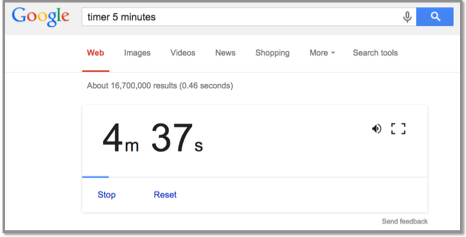
Google Timer
Go to the Google Search Page: www.google.com
Enter: timer 5 minutes (or whatever time you want) 5 minutes is just an example of minutes
Press the enter key.
The timer will automatically start counting down!
Click the speaker icon to mute the alarm.
Click the frame icon to switch to the full-screen mode.

Subscribe to:
Posts (Atom)