Do you have students that struggle with large projects or to-do lists? Do you sometimes struggle with where to start on a task?
Goblin Tools can compile my brain-dump into a list of tasks or help tame the challenge of large tasks or assignments, especially for our neurodivergent students. This is a free online suite of AI-powered mini-apps designed to conquer chaos and boost productivity.
With Goblin Tools you can break big tasks down into manageable steps with 'Magic To Do" or estimate how long a a task might take with 'Estimator'. Do you need help verifying the tone of someones writing or does your writing need to be more formal? Check out 'The Judge' or 'Formalizer'.
Goblin Tools helps you get organized and achieve your goals, one bite-sized chunk at a time.
Showing posts with label UDL. Show all posts
Showing posts with label UDL. Show all posts
Tuesday, May 14, 2024

Tuesday, May 7, 2024
Canva in the Classroom
Have you been looking for a fun way to use technology in the classroom? Have you been wondering how you can use Canva with your students?
Canva is a great tool and they offer it free for educators. If you work in one of my local districts, access is available via Clever, for teachers, staff and students.
I recently attended MACUL and came back with a ton of ideas for using Canva in the classroom. Below is a short list of ways to use it in the classroom. Please reach out if you would like more details about any of the options listed below.
You can use Canva to create:
Teacher / Student Presentations
Group work activities
Interactive Graphic Organizers
Social Media Posts
Google Classroom Headers
Posters
Canva is a great tool and they offer it free for educators. If you work in one of my local districts, access is available via Clever, for teachers, staff and students.
I recently attended MACUL and came back with a ton of ideas for using Canva in the classroom. Below is a short list of ways to use it in the classroom. Please reach out if you would like more details about any of the options listed below.
You can use Canva to create:
Teacher / Student Presentations
Group work activities
Interactive Graphic Organizers
Social Media Posts
Google Classroom Headers
Posters
Newsletters
Flyers
Videos
Videos
Screen Recordings
Whiteboard activities
Comics
Whiteboard activities
Comics
storyboards
digital books
magazine covers
YouTube thumbnails
YouTube thumbnails
...and so many more options.
Tuesday, April 30, 2024
Canva Magic Write
Are you experiencing writer's block or struggling to find the right words?
Canva has you covered with Magic Write! This AI-powered teaching assistant lives within the familiar Canva interface. Simply provide Magic Write with a prompt or topic, and it will generate creative teacher content, such as parent emails, lesson plan starters or even newsletter articles. Polish and personalize the suggestions, and watch your writing flow with the help of Magic Write!
Canva has you covered with Magic Write! This AI-powered teaching assistant lives within the familiar Canva interface. Simply provide Magic Write with a prompt or topic, and it will generate creative teacher content, such as parent emails, lesson plan starters or even newsletter articles. Polish and personalize the suggestions, and watch your writing flow with the help of Magic Write!
Tuesday, April 23, 2024
Canva Magic Design
Are you stuck staring at a blank canvas?
Meet Magic Design, a powerful tool within Canva Magic Studio. Magic Design harnesses the power of AI to turn your ideas into reality in an instant. Type your idea or vision in a few words, or upload your own media to describe what you envision and Magic Design will generate a collection or custom template just for you – an educational presentation, educational video, classroom poster, Google Classroom Header, worksheet or even lesson plans – in seconds.
No design experience required – Magic Design helps you create professional-looking content that will grab attention!
Tuesday, April 16, 2024
Canva Magic Studio
Are you ready to weave AI into your Canva projects? Power up your design toolkit with the top AI-powered design and productivity tools with Canva Magic Studio! This graphic design platform empowers users of all skill levels to create stunning visuals. Canva provides a vast library of templates, images, and fonts, but Magic Studio takes it a step further. Magic Studio uses artificial intelligence to generate unique content, suggest text variations, and remove backgrounds from images – all within the familiar Canva interface.
Did you already know that YCS and LCS have secured an educational account for Canva, accessible through Clever? This account unlocks premium features and content, making it the perfect tool for presentations, reports, and all your creative projects! Click on the icon in Clever to check it out.
Did you already know that YCS and LCS have secured an educational account for Canva, accessible through Clever? This account unlocks premium features and content, making it the perfect tool for presentations, reports, and all your creative projects! Click on the icon in Clever to check it out.
Tuesday, April 9, 2024
Brisk Teaching
Have you been feeling overwhelmed by lesson planning and grading?
Brisk Teaching can be your new teaching companion! This Chrome extension utilizes artificial intelligence to streamline your workflow. Brisk AI integrates seamlessly with Google Workspace, allowing you to create quizzes, interventions, adjust content reading level, and even assess student writing – all without ever leaving your workspace. Breathe a sigh of relief and let Brisk AI help you get back to what matters most: teaching!
Brisk Teaching can be your new teaching companion! This Chrome extension utilizes artificial intelligence to streamline your workflow. Brisk AI integrates seamlessly with Google Workspace, allowing you to create quizzes, interventions, adjust content reading level, and even assess student writing – all without ever leaving your workspace. Breathe a sigh of relief and let Brisk AI help you get back to what matters most: teaching!
Tuesday, April 2, 2024
Magic Student AI
Are you struggling to help your students navigate the exciting world of AI? Magic Student AI is here to help!
MagicSchool for Students is an educational AI platform educational platform designed to build AI literacy for students. It not only teaches students to use AI responsibly, it also unlocks learning opportunities not possible without generative AI.
It's not magic, but it sure feels like it!
MagicSchool for Students is an educational AI platform educational platform designed to build AI literacy for students. It not only teaches students to use AI responsibly, it also unlocks learning opportunities not possible without generative AI.
It's not magic, but it sure feels like it!
Tuesday, March 26, 2024
Bloom's Taxonomy Revisited
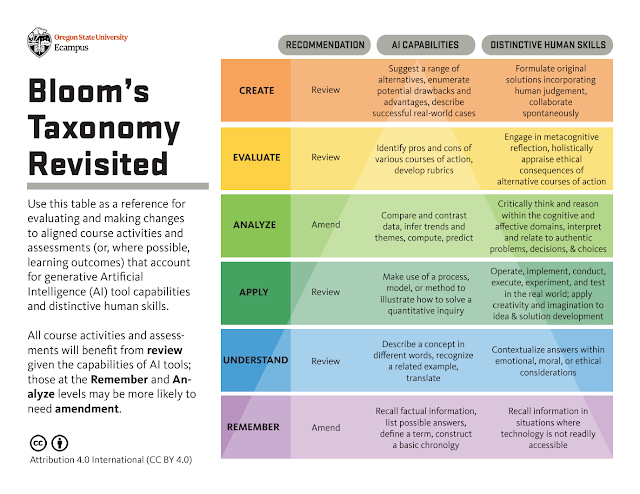
Almost everyone who has taken a course in education has heard of Bloom's Taxonomy. It was created to provide a common language for teachers to discuss learning and assessment methods. Bloom's Taxonomy is an ordering of an individuals' cognitive skills in order to help students and teachers in the classroom. The levels move from remember being the lowest level to creating being the highest level. The levels in Bloom's Taxonomy in order from lowest to highest are: remember, understand, apply, analyze, evaluate and create.

In our new world, with generative AI everywhere, Bloom's Taxonomy has been revisited by Oregon State University, to include information for each level pertaining to AI capabilities and distinctive human skills. Review the information yourself in the link below.
Tuesday, March 19, 2024
A Guide for Elementary Teachers
The last Guide in the ISTE series is Hands-On Project Guides for use in the classroom, A Guide for Elementary Teachers.
You can find this Guide on the ISTE website or by following this link: https://bit.ly/3xRLPGO.
The introduction and the appendices contain a little bit of information about AI and how to use the Guide. The Guide itself contains 4 different projects that you can use with students in Secondary classes, grades K-5, to help guide their thinking about AI.
Tuesday, March 12, 2024
A Guide for Secondary Teachers
As previously mentioned, ISTE offers a series of Hands-On Project Guides for use in the classroom. This week I want to highlight A Guide for Secondary Teachers.
You can find this Guide on the ISTE website or by following this link: https://bit.ly/44ngeZJ.
The introduction and the appendices contain a little bit of information about AI and how to use the Guide. The Guide itself contains 4 different projects that you can use with students in Secondary classes, grades 6–12, to help guide their thinking about AI.
Tuesday, March 5, 2024
A Guide for Electives Teachers
ISTE offers a series of Hands-On Project Guides for use in the classroom. This week I want to highlight A Guide for Elective Teachers.
You can find this Guide on the ISTE website or by following this link: https://adobe.ly/3PJD2Nh.
The introduction and the appendices contain a little bit of information about AI and how to use the Guide. The Guide itself contains 4 different projects that you can use with students in Electives classes, to help guide their thinking about AI.
Tuesday, February 27, 2024
A Guide for Computer Science Teachers
ISTE offers a series of Hands-On Project Guides for use in the classroom. This week I want to highlight A Guide for Computer Science Teachers.
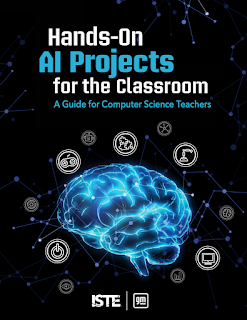
You can find this Guide on the ISTE website or by following this link: https://adobe.ly/4a8tvHZ.
The introduction and the appendices contain a little bit of information about AI and how to use the Guide. The Guide itself contains 4 different projects that you can do with students to help guide their thinking about Computer Science and how AI is already or can be used.
Tuesday, February 20, 2024
A Guide on Ethics and AI
As I mentioned last week, ISTE offers a series of Hands-On Project Guides for use in the classroom. This week I want to highlight A Guide on Ethics and AI.
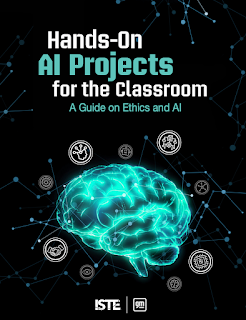
You can find this Guide on the ISTE website or by following this link: https://adobe.ly/49dbpTN.
The introduction and the appendices contain a little bit of information about AI and how to use the Guide. The Guide itself contains 4 different projects that you can do with students to help guide their thinking about ethics and using AI ethically.
Tuesday, February 13, 2024
ISTE AI Guides
Are you interested in learning more about Artificial Intelligence and how you can use it in your classroom?
Although learning about tools are great, learning how to use them in the classroom, both with students and to help us, is essential to appropriate usage.
ISTE is the leading organization in teaching technology in the classroom. ISTE stands for International Society for Technology in Education. They are a nonprofit organization that provides resources, training and support that helps educators use technology to revolutionize learning. Their mission is to empower educators to reimagine and redesign learning through impactful pedagogy and meaningful technology use.
ISTE offers a series of Hands-On Project Guides for use in the classroom. Each guide contains information about AI and projects to do in the classroom.
I will highlight a different guide each week for the next 5 weeks. I hope you find them useful and informative. Next week we will take a look at Ethics and AI.
Tuesday, February 6, 2024
Diffit
If you work in any classroom, differentiating instruction can be a large part of your day. There is a new generative AI program that can help you with this task, Diffit.
Diffit lets you create differentiated resources from your exiting materials or from scratch. You can use Diffit to relevel text, customize vocabulary, translate, and mero.
Sign up for you (currently) free account today.
Tuesday, January 30, 2024
MagicSchool AI
Another new school-based generative AI program you might want to check out is Magic School AI.
This tool is designed specifically for educators. It has over 60 AI tools that can be used for things like composing professional emails to leveling or ordering text.
Check out Magic School AI to sign up for a (currently) free account.
Tuesday, January 9, 2024
SchoolAI
Generative AI programs have exploded in the last year. Some are for personal and professional use, some are for educational use. The generative AI program I would like to highlight this week is SchoolAI.
SchoolAI is an all-in-one AI platform for your classroom. It was specifically designed with K12 students in mind. It has built-in monitoring and controls designed to help teachers guide and support their students.
SchoolAI is an all-in-one AI platform for your classroom. It was specifically designed with K12 students in mind. It has built-in monitoring and controls designed to help teachers guide and support their students.
Check out this video from SchoolAI with information on how to get started.
Tuesday, November 21, 2023
Live Captions in Chrome
Chrome now offers live captions, it can automatically generate real-time captions directly in the browser. With a couple of quick settings adjustments you can automatically create captions for audio and video.
In the Chrome browser, go to the 3-dots menu in the top right corner.

Find ‘Settings’ in the dropdown menu.
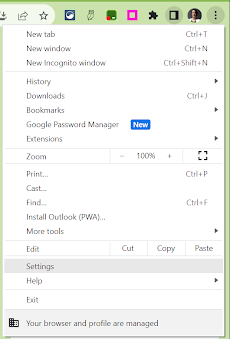
In the menu on the left, open Accessibility.
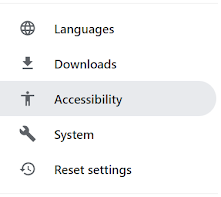
Toggle on ‘Live Caption’.

You can select a preferred language (from a very short, very limited list), delete a caption language from your account and choose to ‘Hide profanity’ in the settings.
In the Chrome browser, go to the 3-dots menu in the top right corner.
Find ‘Settings’ in the dropdown menu.
In the menu on the left, open Accessibility.
Toggle on ‘Live Caption’.
You can select a preferred language (from a very short, very limited list), delete a caption language from your account and choose to ‘Hide profanity’ in the settings.
Tuesday, November 14, 2023
Reading Mode in Chrome
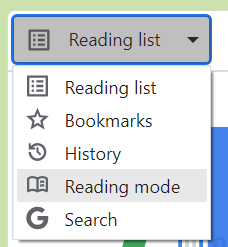
Reading mode in Chrome browser is now available on all Chromebooks. Customize your reading experience with reading mode. It allows you to more easily focus on the text, reduce distractions from images and videos, adjust the font and size, the spacing and the background color for any article or webpage you are reading.
To access Reading mode, open the reading list icon in the extensions bar.

On the dropdown that says ‘reading list’ select ‘reading mode’.
Adjust the size of the reading window using the 2 vertical, parallel lines on the left.

Adjust, from a limited set of options, the font style, size, spacing and background color.

Tuesday, November 7, 2023
Start of the Year
I hope everyone has had a wonderful start to the 2023-2024 school year!
It has been very busy over here, in the technology world. With the return of all of the staff and students on top of a variety of new district initiatives, it has not been dull.
I look forward to writing some new blog posts for you this year. I will touch on both Assistive Technology and Universal Design for Learning options.
Although the use of AI has been around for a while when OpenAI launched its new Generative AI called ChatGPT last November it seems to be the topic everyone wants to know more about.
Since the launch of ChatGPT there are new generative AI platforms every day. I will touch on some of them this school year, especially those that can be used in education, to help both teachers and students.
I look forward to another great year of AT/UDL blog posts, I hope you do too!
It has been very busy over here, in the technology world. With the return of all of the staff and students on top of a variety of new district initiatives, it has not been dull.
I look forward to writing some new blog posts for you this year. I will touch on both Assistive Technology and Universal Design for Learning options.
Although the use of AI has been around for a while when OpenAI launched its new Generative AI called ChatGPT last November it seems to be the topic everyone wants to know more about.
Since the launch of ChatGPT there are new generative AI platforms every day. I will touch on some of them this school year, especially those that can be used in education, to help both teachers and students.
I look forward to another great year of AT/UDL blog posts, I hope you do too!
Subscribe to:
Posts (Atom)