Do you have students that struggle with large projects or to-do lists? Do you sometimes struggle with where to start on a task?
Goblin Tools can compile my brain-dump into a list of tasks or help tame the challenge of large tasks or assignments, especially for our neurodivergent students. This is a free online suite of AI-powered mini-apps designed to conquer chaos and boost productivity.
With Goblin Tools you can break big tasks down into manageable steps with 'Magic To Do" or estimate how long a a task might take with 'Estimator'. Do you need help verifying the tone of someones writing or does your writing need to be more formal? Check out 'The Judge' or 'Formalizer'.
Goblin Tools helps you get organized and achieve your goals, one bite-sized chunk at a time.
Showing posts with label Classroom Management. Show all posts
Showing posts with label Classroom Management. Show all posts
Tuesday, May 14, 2024

Tuesday, February 6, 2024
Diffit
If you work in any classroom, differentiating instruction can be a large part of your day. There is a new generative AI program that can help you with this task, Diffit.
Diffit lets you create differentiated resources from your exiting materials or from scratch. You can use Diffit to relevel text, customize vocabulary, translate, and mero.
Sign up for you (currently) free account today.
Tuesday, January 30, 2024
MagicSchool AI
Another new school-based generative AI program you might want to check out is Magic School AI.
This tool is designed specifically for educators. It has over 60 AI tools that can be used for things like composing professional emails to leveling or ordering text.
Check out Magic School AI to sign up for a (currently) free account.
Tuesday, January 9, 2024
SchoolAI
Generative AI programs have exploded in the last year. Some are for personal and professional use, some are for educational use. The generative AI program I would like to highlight this week is SchoolAI.
SchoolAI is an all-in-one AI platform for your classroom. It was specifically designed with K12 students in mind. It has built-in monitoring and controls designed to help teachers guide and support their students.
SchoolAI is an all-in-one AI platform for your classroom. It was specifically designed with K12 students in mind. It has built-in monitoring and controls designed to help teachers guide and support their students.
Check out this video from SchoolAI with information on how to get started.
Tuesday, November 28, 2023
Formative
Although I usually provide tools or tricks more focused on student use and success, this one is great for teachers.
Formative is a tool that provides teachers with tools to engage, instruct, and assess their students.
Just a few of the things you can do with Formative include transforming a PDF or Google Doc into an auto-graded quiz, enhancing reading passages with questions, promoting higher-level thinking with advanced Math tools, and unleashing student creativity with the option of audio and video responses.
Check out Formative for yourself.
Tuesday, January 31, 2023
Postlight Reader
Postlight Reader is a Google Extension that allows you to remove webpage noise and clutter from an article to make it easier for students to read.


Postlight Reader allows you to make minor changes to font style, size and light/dark background options.


Not only is this extension great for students, teachers can also use it for clearing out the clutter on articles that need to be printed or shared with others.
Tuesday, January 24, 2023
Keyboard Shortcuts for Chromebooks
Keyboard shortcuts make my life so much easier. I love them.
I found a great article that lists some great keyboard shortcuts for Chromebooks.
I found a great article that lists some great keyboard shortcuts for Chromebooks.
Check out KEYBOARD SHORTCUTS FOR KIDS (https://www.coderkids.com/blog/keyboard-shortcuts-for-kids) from CoderKids.
Tuesday, January 10, 2023
Board Games in the Elementary Classroom
As we approach the heart of the winter here in Michigan, students will be spending more and more recesses inside. Teachers are always looking for activities to keep kids occupied during these times.
Have you considered board games?
Besides being a fun activity for the kids during these unplanned times, board games can be a great way for a student to show skills related to IEP goals or state academic standards. For these reasons board games are great items for your classroom.
Here is a list of 21 of the Best Board Games for the Elementary Classroom (https://www.weareteachers.com/best-board-games-for-elementary/).
Tuesday, December 6, 2022
Google Slides: Closed Captions
Google Slides offers a Closed Captions option. This can help anyone read what is being said by the presenter. If the microphone is good enough it will also pick up any questions asked by audience members.
To use Closed Captions in Google Slides check out this easy to follow tutorial.
Tuesday, May 10, 2022
Classroomscreen.com
Classroomscreen.com is a simple website that offers easy access to tools for face-to-face or virtual teaching sessions. It contains 16 different widgets, such as a timer, random name picker and work time visuals, to support all your classroom activities and help students get to work.
Tuesday, March 1, 2022
OpenSymbols
Are you looking for free picture symbols to use in your classroom?
OpenSymbols (https://www.opensymbols.org/) is a collection of creative commons picture symbols that can be used for augmentative communication. The collection pulls from multiple sources and currently includes access to more than 50,000 symbols and icons!
Tuesday, November 16, 2021
5 Fun and Easy Equipment Free Games
As the colder weather begins here in Michigan, teachers are always looking for indoor movement activities in case outdoor recess is not an option. Other teachers are always on the lookout for quick brain break activities.

Their blog post this week is 5 Fun and Easy Equipment Free Games (https://bit.ly/30dAXlU).
Follow the links to check out the site and their recent blog post.
Tuesday, October 26, 2021
OneTab
Some Google Extensions are great tools for productivity and organization. One Extension that can be very helpful is OneTab.
OneTab
One Tab allows you to convert all of your open tabs into a list of URLs.

From the list you can restore your tabs individually or all at once.

Using OneTab can conserve battery power on a laptop/Chromebook. It can also help speed up your device. OneTab temporarily reduces the amount of memory your computer or chromebook uses, when you keep too many tabs running in the background.
The URL list can also be exported to save for later or to be shared with someone.

OneTab may be just the tool your students need when they are working on a research paper for your class. They can open and view multiple tabs. When computer time is over, they send the OneTab list to their G-Mail for later review and use. They will have all of their research available to them, without having to continually start over or remember what they had searched for previously.
Tuesday, October 12, 2021
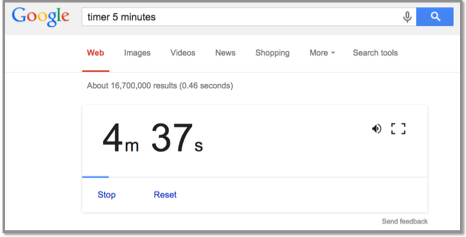
Google Timer - guest writer Jerilyn Lynn
In order to provide great information for my readers, I have enlisted the help of some guest writers.
This week I am using a write-up from Jerilyn Lynn, M.I.L.S - University of Michigan, Technology Resource Specialist for Ypsilanti Community Schools.
Google Timer
Go to the Google Search Page: www.google.com
Enter: timer 5 minutes (or whatever time you want) 5 minutes is just an example of minutes
Press the enter key.
The timer will automatically start counting down!
Click the speaker icon to mute the alarm.
Click the frame icon to switch to the full-screen mode.

Tuesday, April 6, 2021
Visual Timers
If you have a student that struggles with time management, they may need a visual time to help. Visual timers can also be used to help keep students on task and for some students they are motivating.
Timers can be a stand alone device such as the Time Timer (https://www.timetimer.com/). They are also integrated into Android & iOS devices, and can be visual as well. You can also do a quick search in Google for a timer if you want to have it on a Google Chrome compatible device or to share it up on a smart board for the whole class to see.
Timers can be a stand alone device such as the Time Timer (https://www.timetimer.com/). They are also integrated into Android & iOS devices, and can be visual as well. You can also do a quick search in Google for a timer if you want to have it on a Google Chrome compatible device or to share it up on a smart board for the whole class to see.
Tuesday, March 2, 2021
IRIS Center Learning Module: Parents: Supporting Learning During the COVID-19 Pandemic
The IRIS Center, Peabody College, Vanderbilt University had a variety of fantastic learning modules. They are continually adding new modules or updating existing modules. Recently I found out about one called:
Parents: Supporting Learning During the COVID-19 Pandemic. (https://iris.peabody.vanderbilt.edu/module/c19/)
This resource offers tips to support your child’s learning at home during the COVID-19 pandemic. It is full of great ideas to try and suggestions that might work at home and at school.
Parents: Supporting Learning During the COVID-19 Pandemic. (https://iris.peabody.vanderbilt.edu/module/c19/)
This resource offers tips to support your child’s learning at home during the COVID-19 pandemic. It is full of great ideas to try and suggestions that might work at home and at school.
Tuesday, February 23, 2021
IRIS Center - Helping Student's Stay Focused
Teaching online isn’t always easy. Learning online isn't easy either. If you are struggling to help your student or child, you are not alone!
The IRIS Center, Peabody College, Vanderbilt University has come up with a quick Parent Tips Sheet to keep students focused during online learning.
You can find the Parent Tips Sheet by following the link below:
Tuesday, February 16, 2021
IRIS Center - Parent Tips for Online Learning
Although some districts are returning to face-to-face learning, some are still full virtual or are doing some sort of hybrid model. Regardless of which option your students are attending, we are all burned out this year. Teachers and parents are looking for help.
The IRIS Center, Peabody College, Vanderbilt University has put together a 2-page Parent tips sheet that might be helpful for all of us. You can find the sheet at:
Wednesday, February 3, 2021
Using Pear Deck to Make Your Google Slides Presentations Interactive
Pear Deck is a tool that can be used for a variety of educational options. I found a great video by Stacey Roshan (http://bit.ly/2YDAN3h) about how to use Pear Deck to make Google Slides presentations interactive. The video will show you how to install the Pear Deck add-on, how to add various types of slides, how to customize draggable slides and what the presentation looks like from both the teacher and student end.
Stacey also has a great follow up video with tips for using Pear Deck as a student paced, asynchronous option for learning.
Tips for Using Pear Deck's Student Paced Mode
(https://bit.ly/3rjLUuA)
(https://bit.ly/3rjLUuA)
Tuesday, November 10, 2020
Virtual Morning Meeting Activities for Distance Learning
Although most teachers have already set up a classroom routine, it is nice to hear new ideas. It is also beneficial to go over and review your virtual class protocols. This short video may help with any or all of these needs.
Maddie at EdTech Classroom created a short video on how to do a Virtual Morning Meeting Activities for Distance Learning (https://youtu.be/bk2h-3xuNDg).
Maddie at EdTech Classroom created a short video on how to do a Virtual Morning Meeting Activities for Distance Learning (https://youtu.be/bk2h-3xuNDg).
Thinking outside the box...
How can you use these ideas in other areas of your virtual day?
Subscribe to:
Posts (Atom)