Showing posts with label Communication. Show all posts

Tuesday, November 21, 2023

Live Captions in Chrome

Chrome now offers live captions, it can automatically generate real-time captions directly in the browser. With a couple of quick settings adjustments you can automatically create captions for audio and video.

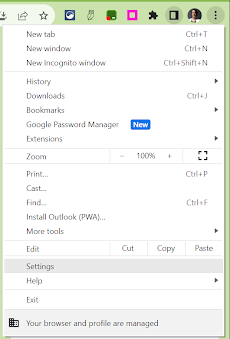
In the Chrome browser, go to the 3-dots menu in the top right corner.


Find ‘Settings’ in the dropdown menu.


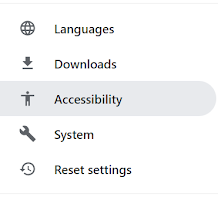
In the menu on the left, open Accessibility.


Toggle on ‘Live Caption’.


You can select a preferred language (from a very short, very limited list), delete a caption language from your account and choose to ‘Hide profanity’ in the settings.

Tuesday, March 21, 2023

Presentation Skills Toolkit

Learning presentation skills has been identified as essential for building one’s capacity to plan, facilitate, and share any content in oral presentation form.

The REMC Association of Michigan has great resources teachers can use to help build these skills within their students, during classroom lessons.

PRESENTATION SKILLS TOOLKIT (https://www.remc.org/classroom-resources/presentation-skills-toolkit/)

This REMC toolkit offers students and educators learning resources, reflection points, and exercises to improve presentation techniques, for all grades and ages.  There are lessons available in 5 different categories: collaborator, audience-centric design, establishing credibility & purpose, and presenting with clarity & confidence.  

Tuesday, November 29, 2022

Remove.bg

Remove.bg (https://www.remove.bg/) is an easy way to remove the background from a picture. You could use this to make visuals for a classroom, or icons for an AAC device. It is very fast and no account needed.

Tuesday, November 8, 2022

Enabling and Using Dictation

 Take a moment to consider your students. 

Think about the ones who struggle to get their ideas onto paper. How about the students who struggle with spelling or have fine motor control issues.  Do you have students in which English is not their first language?


Speech to Text is a tool that can help these students and many others. It is an Accessibility feature built into most devices today. Speech to Text is a tool that allows a writer to dictate their thoughts and ideas into a document. 


Speech to Text, also known as Dictation, is available on Chromebooks and iPads.  To enable and use dictation on these devices follow the instructions in the tutorials below.


Enabling and Using Dictation on a Chromebook (http://bit.ly/3GobetQ)


Enabling and Using Dictation on an iPad (http://bit.ly/3MntMLC)


Give it a try! Your students will love it (and so will you)!


Tuesday, March 1, 2022

OpenSymbols

Are you looking for free picture symbols to use in your classroom?

OpenSymbols (https://www.opensymbols.org/) is a collection of creative commons picture symbols that can be used for augmentative communication. The collection pulls from multiple sources and currently includes access to more than 50,000 symbols and icons!

Tuesday, May 18, 2021

Captions in Google Slides

Did you know that in Google Slides you can turn on automatic captions to display the speaker's words in real time?  
This can be helpful for individuals with hearing impairments as well as those learning to read.  

Follow the link below to get to Google Support for more information.  

https://support.google.com/docs/answer/9109474?hl=en

Tuesday, April 13, 2021

AVA - Web Captioner

Are you looking for a program that will caption in-person and online conversations?

Ava Closed Captions (Ava.me) is available for Mac, Windows, Web, Android, and iOS devices. With just one click you can display instant captions, no matter what tool you use.

Ava offers free, unlimited automatic captions powered by the best-in-class speech recognition software.  Ava uses AI to transcribe instantly what people say.  With Ava you can caption live conversation, online meetings or even online videos.

Tuesday, April 6, 2021

Visual Timers

If you have a student that struggles with time management, they may need a visual time to help. Visual timers can also be used to help keep students on task and for some students they are motivating.

Timers can be a stand alone device such as the Time Timer (https://www.timetimer.com/). They are also integrated into Android & iOS devices, and can be visual as well. You can also do a quick search in Google for a timer if you want to have it on a Google Chrome compatible device or to share it up on a smart board for the whole class to see.

Tuesday, February 23, 2021

IRIS Center - Helping Student's Stay Focused

Teaching online isn’t always easy.  Learning online isn't easy either.  If you are struggling to help your student or child, you are not alone! 

The IRIS Center, Peabody College, Vanderbilt University has come up with a quick Parent Tips Sheet to keep students focused during online learning.  

You can find the Parent Tips Sheet by following the link below:

https://iris.peabody.vanderbilt.edu/wp-content/uploads/misc_media/information_briefs/parent_tip_sheet_02.pdf#content

Tuesday, February 16, 2021

IRIS Center - Parent Tips for Online Learning

Although some districts are returning to face-to-face learning, some are still full virtual or are doing some sort of hybrid model. Regardless of which option your students are attending, we are all burned out this year. Teachers and parents are looking for help. 
The IRIS Center, Peabody College, Vanderbilt University has put together a 2-page Parent tips sheet that might be helpful for all of us.  You can find the sheet at:

Tuesday, November 10, 2020

Virtual Morning Meeting Activities for Distance Learning

Although most teachers have already set up a classroom routine, it is nice to hear new ideas. It is also beneficial to go over and review your virtual class protocols. This short video may help with any or all of these needs.

Maddie at EdTech Classroom created a short video on how to do a Virtual Morning Meeting Activities for Distance Learning (https://youtu.be/bk2h-3xuNDg).  

Thinking outside the box... 
How can you use these ideas in other areas of your virtual day?

Tuesday, October 6, 2020

Tuesday, September 29, 2020

Sensory Rooms May Help Ease the Anxiety Students Feel from COVID-19

Although I don't generally post "non-tech" information I found this article informative and relevant. We ALL, students and staff, need time away from screens and technology.  We need time to rest, relax and recharge.

Sensory Rooms May Help Ease the Anxiety Students Feel from COVID-19  (https://bit.ly/3jL03xl)

Tuesday, March 17, 2020

Otter Voice Meeting Notes

Technology is improving everyday and it seems like nothing is improving faster than speech to text.  AISence Inc. is a startup on a mission to make voice conversations more valuable for everyone.

AISence has created a program called Otter, that will now record and take meeting notes for you in real-time.  Otter helps you capture and manage verbal communication through meetings, video conferences, school lectures, and other important conversations.

There is a free version of Otter and a Premium version.  With the free version you get 600 minutes of transcription every month and the plan does not expire.  The Premium plan offers 6,000 minutes per month.

Image of Otter iOS app icon.Download Otter Voice Meeting Notes for:
Android  (https://play.google.com/store/apps/details?id=com.aisense.otter)
iOS  (https://apps.apple.com/us/app/otter-ai/id1276437113?ls=1)
Or, create an account in your Google Chrome browser at otter.ai.

To learn more about Otter go to otter.ai.

Tuesday, March 10, 2020

Google Sheets as a Translator

Did you know that you can use the cells in Google Sheets to create a translation dictionary?  Google currently has over 50 languages available and you can translate from one language to another, not just English to the others.
This would be a great tool to use for those learning English as a second language as well as for those trying to learn any foreign language.  You could expand your sheet to include images or even brief descriptions, whatever would be helpful for you or your students. 

For more information please see the YouTube, How to Automatically Translate Google Sheets Cells (https://www.youtube.com/watch?v=MEibCyjPMh4).

I am also including a link to the Languages Codes (https://developers.google.com/admin-sdk/directory/v1/languages) currently available in Google.

I have started a Google Sheet with translation from English to Spanish that you can take a look at as well, click the link below to make your own copy.
Translation Dictionary  (https://docs.google.com/spreadsheets/d/1JvbtxT1tXM7s-lvb0_ZjNjUw7nvGlh3jmCBVFfdHY-g/copy)

Google Sheets are versatile.  You could make a new tab for each language or, like in the video, make each column a different language as well.

Tuesday, March 3, 2020

Aided Language Stimulation Explained

Aided Language Stimulation Explained  (https://tinyurl.com/glj7c4u)

Teach a student to use a communication device to generate language by using the communication device as a model.  Watch this PowToon video created by Chris Bugaj to learn a little about the importance of modeling the use of a communication device.

Tuesday, February 25, 2020

Keeping Pace

Keeping Pace (https://tinyurl.com/qtwe3gm)


This is an instructional video on how to use the communication strategy of a Pacing Board.  It was created by and stars Chris Bugaj himself.  

Tuesday, February 18, 2020

Strategies for Eliciting Language

Strategies for Eliciting Language  (https://tinyurl.com/wdek6dc)

Another video created by Chris Bugaj and his colleagues at Loudoun County Public Schools.  This video shows how language scripts posted around the room can be used by assistants, substitutes, and other educators in order to help students learn to communicate.

Tuesday, February 11, 2020

Effective Communication Strategies

Chris Bugaj, CCC-SLP, is an AT Specialist, author, podcast host, app developer ... the list keeps going.  A few years back, when Chris worked for Loudoun County Public Schools, he and some of his colleagues created some informative videos on communication strategies.  I recently stumbled upon these videos while I was doing some other research.  The videos are a few years old but the information is accurate and worth sharing.  Over the next few weeks I will be sharing these short videos, giving you ideas of how to promote language in your classroom, your lessons, and for individual students.  

Effective Communication Strategies All Day Long (https://tinyurl.com/vvfvlkp)

This video describes how to infuse communication strategies into preschool classrooms, all day long.  The information shared can easily be transferred to and used in higher grade levels as well.

Effective Communication Strategies worksheet (PDF version) (https://tinyurl.com/vl4lt22)

Tuesday, January 21, 2020

Twitter as a Tool

Twitter (twitter.com) can be used as a great tool for professional development, teaching tips and communication with students and parents. There are a variety of teachers, Assistive Technology Specialists and Universal Design for Learning professionals that post on Twitter.

Check out a few hashtags for yourself, you can start with:
#assistivetechnology
#AT 
#universaldesignforlearning 
#UDL
You can also follow me at @Kendra_Jean7791 as a starting point for your Twitter learning experience.

Creating a classroom hashtag, to use as a parent communication tool, to let parents see some of the great things you and your students are doing in the classroom, is also a great way to use Twitter as a Tool.

Get started on you Twitter journey today!