Creating effective quizzes can be time-consuming. What if there was an AI assistant that could help?
Conker is a user-friendly AI-powered platform that can streamline the process of creating quizzes and formative assessments, saving you time and effort. With a topic or learning standard Conker can generate unique quizzes with a variety of question types, including multiple choice, fill-in-the-blank, and true/false.
Conker even integrates seamlessly with Google Classroom, making distribution and grading a breeze.
Give Conker a try today!
Showing posts with label website. Show all posts
Showing posts with label website. Show all posts
Tuesday, May 21, 2024

Tuesday, May 7, 2024
Canva in the Classroom
Have you been looking for a fun way to use technology in the classroom? Have you been wondering how you can use Canva with your students?
Canva is a great tool and they offer it free for educators. If you work in one of my local districts, access is available via Clever, for teachers, staff and students.
I recently attended MACUL and came back with a ton of ideas for using Canva in the classroom. Below is a short list of ways to use it in the classroom. Please reach out if you would like more details about any of the options listed below.
You can use Canva to create:
Teacher / Student Presentations
Group work activities
Interactive Graphic Organizers
Social Media Posts
Google Classroom Headers
Posters
Canva is a great tool and they offer it free for educators. If you work in one of my local districts, access is available via Clever, for teachers, staff and students.
I recently attended MACUL and came back with a ton of ideas for using Canva in the classroom. Below is a short list of ways to use it in the classroom. Please reach out if you would like more details about any of the options listed below.
You can use Canva to create:
Teacher / Student Presentations
Group work activities
Interactive Graphic Organizers
Social Media Posts
Google Classroom Headers
Posters
Newsletters
Flyers
Videos
Videos
Screen Recordings
Whiteboard activities
Comics
Whiteboard activities
Comics
storyboards
digital books
magazine covers
YouTube thumbnails
YouTube thumbnails
...and so many more options.
Tuesday, December 12, 2023
More FigJam
Last week I shared the announcement that Jamboard will be sunsetting in 2024 and the recommended alternative is FigJam. This week I would like to provide some training information for FigJam.
If you are unfamiliar with Eric Curts, he is the creator of the blog ControlAltAchieve, author of the book "Control Alt Achieve: Rebooting Your Classroom with Creative Google Projects", speaker, trainer, and a Technology Integration Specialist for SPARCC in North Canton, Ohio.
Eric has created a couple of great webinars on how to use FigJam that I want to share with you this week.
FigJam also has a YouTube channel full of short videos on how to use some of the features of FigJam.
Tuesday, December 5, 2023
FigJam, the Alternative to Jamboard
If you have not already heard, Google will be sunsetting Jamboard in 2024. They have recommended FigJam as the alternative. Like Jamboard, with FigJam you can brainstorm, align decisions, and collaborate —all in one place.
The following announcement and information has come directly from FigJam:
To make the transition as seamless as possible, FigJam has launched an importer that converts your Jams into FigJam files in seconds. Most importantly, all your Jamboard elements—including stickies, images, text and more—will still be fully editable in your new FigJam file so you can be up and running without losing a beat!
Here's how to get started:
Import your Jamboard files: Visit figma.com and click the “Import” button in the top right corner to start converting your Jamboards to FigJam files. To learn more, check out our importer tutorial or help center article.
Get started with FigJam: Find more ideas on how to use FigJam in your classroom with our tutorials and free template library.
Join a training: Meet the Figma for Education team during a free live training where you'll learn the basics, walk through classroom applications and ask any questions.
Tuesday, November 28, 2023
Formative
Although I usually provide tools or tricks more focused on student use and success, this one is great for teachers.
Formative is a tool that provides teachers with tools to engage, instruct, and assess their students.
Just a few of the things you can do with Formative include transforming a PDF or Google Doc into an auto-graded quiz, enhancing reading passages with questions, promoting higher-level thinking with advanced Math tools, and unleashing student creativity with the option of audio and video responses.
Check out Formative for yourself.
Tuesday, February 21, 2023
REMC Association of Michigan
REMC, Regional Educational Media Center Association of Michigan. REMC is a 501(c)(3) nonprofit organization established in 1969. Its members are the 28 local Regional Educational Media Centers operated through the Intermediate School District structure.
The REMC Association of Michigan believes it must provide proactive leadership to the Michigan educational community in building a vision that supports quality teaching and learning, the effective use of educational technology and provides equity to Michigan's pre-K-12 students.
This belief has led to a wonderful website full of resources, a variety of professional development opportunities (most of which offer FREE SCECHs) and a great group of REMC and RITS staff willing to help.
Check out what they have to offer by visiting https://www.remc.org/ today.
Tuesday, February 7, 2023
Rewordify.com
Have you ever read a text, even reread the text and you still have no idea what you read. Some of our students experience this everyday.
Rewordify.com can help both you and your students!
Rewordify.com can help both you and your students!
To use Rewordify simply enter hard sentences into the yellow box, click 'Rewordify text' and you'll instantly see an easier version. Rewordify even highlights the words it changed and with a simple click, helps you learn the original word.
Check out Rewordify.com for yourself. I know you (and your students) will love it!
Tuesday, November 29, 2022
Tuesday, May 10, 2022
Classroomscreen.com
Classroomscreen.com is a simple website that offers easy access to tools for face-to-face or virtual teaching sessions. It contains 16 different widgets, such as a timer, random name picker and work time visuals, to support all your classroom activities and help students get to work.
Tuesday, April 19, 2022
Note Anywhere
Have you ever wanted to leave a note on a webpage? Are you looking for a tool to leave some thoughts while doing some research?
I have a great option for you to try, Note Anywhere.

Note Anywhere is a Google Extension. It allows you to add Post-it type notes to almost any web page.
The notes stay on the page until you delete them and load auto-magically when you open the web page. The extension icon tells you how many post-its you have on a page when you are on the page.
If you right click on the Note Anywhere icon in your extensions tool bar, you can open the options menu. Within options you can change the color of the post-it note. You can also view a summary of where you have notes. It will provide you with a list of URL links to the articles with notes on them.
Note Anywhere can be a useful research tool for both teachers and students.
I have a great option for you to try, Note Anywhere.
Note Anywhere is a Google Extension. It allows you to add Post-it type notes to almost any web page.
The notes stay on the page until you delete them and load auto-magically when you open the web page. The extension icon tells you how many post-its you have on a page when you are on the page.
If you right click on the Note Anywhere icon in your extensions tool bar, you can open the options menu. Within options you can change the color of the post-it note. You can also view a summary of where you have notes. It will provide you with a list of URL links to the articles with notes on them.
Note Anywhere can be a useful research tool for both teachers and students.
Tuesday, February 22, 2022
whiteboard.chat
Would you like to collaborate with your students, using an online whiteboard?
Whiteboard.chat is a free interactive online whiteboard for teachers and students to collaborate digitally. You can easily observe all of your students, on individual whiteboards or demonstrate something to the whole class on a single board.
Although it is free for educators, there are some limitations. You can have up to 10 class boards. If you don't touch a board for 7 days, it will be deleted.
Whether you are creating individual student boards or one class board, inviting student is as easy as sharing the board specific code.
Although it takes a little exploring to figure out how to navigate at first, there are some really COOL features in whiteboard.chat!
Do you want to show your kids how to break down money, give change?
Open a new board.
On the right open Gizmos:

In the menu find US Currency:
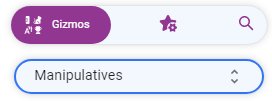

Add some different denominations of money to the board.
On the left go to Tools, Break Down:

With the crosshairs, click on any of the bills or coins (larger than a penny) you added!
Tuesday, November 16, 2021
5 Fun and Easy Equipment Free Games
As the colder weather begins here in Michigan, teachers are always looking for indoor movement activities in case outdoor recess is not an option. Other teachers are always on the lookout for quick brain break activities.

Their blog post this week is 5 Fun and Easy Equipment Free Games (https://bit.ly/30dAXlU).
Follow the links to check out the site and their recent blog post.
Tuesday, June 1, 2021
Free Digital Fidgets
Do you have some students that need an activity that provides them with a moment to redirect their own attention or disruptive thoughts / actions? Is there a way to provide this opportunity without having physical, hands-on materials available?
Try some digital fidgets!
Try some digital fidgets!
Digital Fidget Spinner (https://www.fidgetspin.xyz/)
Sand Swirling (https://apps.amandaghassaei.com/FluidSimulation/)
Virtual Bubble Wrap (https://scratch.mit.edu/projects/66060262/)
Tuesday, March 17, 2020
Otter Voice Meeting Notes
Technology is improving everyday and it seems like nothing is improving faster than speech to text. AISence Inc. is a startup on a mission to make voice conversations more valuable for everyone.
 Download Otter Voice Meeting Notes for:
AISence has created a program called Otter, that will now record and take meeting notes for you in real-time. Otter helps you capture and manage verbal communication through meetings, video conferences, school lectures, and other important conversations.
There is a free version of Otter and a Premium version. With the free version you get 600 minutes of transcription every month and the plan does not expire. The Premium plan offers 6,000 minutes per month.
 Download Otter Voice Meeting Notes for:
Android (https://play.google.com/store/apps/details?id=com.aisense.otter)
iOS (https://apps.apple.com/us/app/otter-ai/id1276437113?ls=1)
To learn more about Otter go to otter.ai.
Tuesday, January 28, 2020
What Teachers Need to Know to Help Left-Handed Students Succeed
WeAreTeachers.com has come out with another great article that I would like to share.
I think it is safe to say that we all know someone who is left-handed. My dad is left-handed and I have a few cousins that are as well. WeAreTeachers.com has published an article that contains some great tips and strategies to help lefties be successful in your classroom.
Check out What Teachers Need to Know to Help Left-Handed Students Succeed (https://www.weareteachers.com/left-handed-students) for more information.
I think it is safe to say that we all know someone who is left-handed. My dad is left-handed and I have a few cousins that are as well. WeAreTeachers.com has published an article that contains some great tips and strategies to help lefties be successful in your classroom.
Check out What Teachers Need to Know to Help Left-Handed Students Succeed (https://www.weareteachers.com/left-handed-students) for more information.
Tuesday, January 21, 2020
Twitter as a Tool
Twitter (twitter.com) can be used as a great tool for professional development, teaching tips and communication with students and parents. There are a variety of teachers, Assistive Technology Specialists and Universal Design for Learning professionals that post on Twitter.
Check out a few hashtags for yourself, you can start with:
Check out a few hashtags for yourself, you can start with:
#assistivetechnology
#AT
#universaldesignforlearning
#UDL
You can also follow me at @Kendra_Jean7791 as a starting point for your Twitter learning experience.
Creating a classroom hashtag, to use as a parent communication tool, to let parents see some of the great things you and your students are doing in the classroom, is also a great way to use Twitter as a Tool.
Get started on you Twitter journey today!
Creating a classroom hashtag, to use as a parent communication tool, to let parents see some of the great things you and your students are doing in the classroom, is also a great way to use Twitter as a Tool.
Get started on you Twitter journey today!
Tuesday, January 14, 2020
DF Tube (Distraction Free for YouTube™)
DF Tube (Distraction Free for YouTube™) (https://tinyurl.com/yd3x2lag) is a Google Extension that is used to hide the video recommendations sidebar and the related videos that appear at the end of videos. It also removes the grid of recommended videos that appear on your homepage. All of the settings in DF Tube are configurable and allows you to hide comments and disable playlists sitewide.
YouTube™, as a company, is directly incentivized to create views and get as many ad clicks as possible. Because of this we are often overwhelmed with thumbnails and advertisements from every angle. While this is good for someone looking to kill time, it is not so good if you are trying to focus on educational content, do research, or find some relaxing music to groove to.
Give it a try for yourself and see how much more productive you can be!
YouTube™, as a company, is directly incentivized to create views and get as many ad clicks as possible. Because of this we are often overwhelmed with thumbnails and advertisements from every angle. While this is good for someone looking to kill time, it is not so good if you are trying to focus on educational content, do research, or find some relaxing music to groove to.
Give it a try for yourself and see how much more productive you can be!
Tuesday, January 7, 2020
Math Games
Even though the word technology is in the phrase Assistive Technology, it is not always about high tech. Using low tech options, such as manipulative, can be helpful for all students when teaching math concepts.
In the article 16 Fun and Free First Grade Math Games and Activities (https://tinyurl.com/w6gspte) from WeAreTeachers.com there are a variety of hands on math activities, some of which can be adapted for higher level math concepts. Many of these activities could be used as indoor recess game options as well, such as 100 chart battleship, dot arrangement bowling or Shut-The-Box.
Take a look at these great math game and activity ideas to determine how you can use them in your classroom today.
In the article 16 Fun and Free First Grade Math Games and Activities (https://tinyurl.com/w6gspte) from WeAreTeachers.com there are a variety of hands on math activities, some of which can be adapted for higher level math concepts. Many of these activities could be used as indoor recess game options as well, such as 100 chart battleship, dot arrangement bowling or Shut-The-Box.
Take a look at these great math game and activity ideas to determine how you can use them in your classroom today.
Tuesday, December 17, 2019
Plagiarism Checker
I have been working with a student that attends classes at a local university. His teacher consultant, a colleague and friend of mine, was doing some research on free plagiarism checkers to use with her students when she discovered Free Online Plagiarism Checker Tool by Publi6 (https://freeplagiarismchecker.pro/en).
Students can use plagiarism detection software to check completed class work, essays or research assignments. Students can face penalties for plagiarism, including failing an assignment, being put on academic probation, or even face expulsion at some colleges and universities. Students should be aware that even unintentional plagiarism can be viewed as plagiarism and may be dealt with accordingly.
If you have students working on writing assignments or research projects, make sure they check for plagiarism before they turn it in for grading.
Tuesday, November 19, 2019
26 Must-Watch TED Talks
Who has heard of TED Talks?
TED is a nonprofit organization devoted to sharing ideas on a variety of topics. TED began as a conference that brought together the world’s most innovative people in Technology, Entertainment and Design to deliver short yet powerful talks in 18 minutes or less. Today TED Talks cover almost all topics in more than 100 languages.
TED Talks can be a phenomenal classroom resource for engaging students and sparking meaningful conversations. Take a look at the list of TED Talks in the link from We Are Teachers below. How can you use them to engage the students in your classroom?
26 Must-Watch TED Talks to Spark Student Discussions (https://tinyurl.com/yyry6bw3)
TED is a nonprofit organization devoted to sharing ideas on a variety of topics. TED began as a conference that brought together the world’s most innovative people in Technology, Entertainment and Design to deliver short yet powerful talks in 18 minutes or less. Today TED Talks cover almost all topics in more than 100 languages.
TED Talks can be a phenomenal classroom resource for engaging students and sparking meaningful conversations. Take a look at the list of TED Talks in the link from We Are Teachers below. How can you use them to engage the students in your classroom?
26 Must-Watch TED Talks to Spark Student Discussions (https://tinyurl.com/yyry6bw3)
Subscribe to:
Posts (Atom)