Are you experiencing writer's block or struggling to find the right words?
Canva has you covered with Magic Write! This AI-powered teaching assistant lives within the familiar Canva interface. Simply provide Magic Write with a prompt or topic, and it will generate creative teacher content, such as parent emails, lesson plan starters or even newsletter articles. Polish and personalize the suggestions, and watch your writing flow with the help of Magic Write!
Showing posts with label Class Project. Show all posts
Showing posts with label Class Project. Show all posts
Tuesday, April 30, 2024

Tuesday, April 23, 2024
Canva Magic Design
Are you stuck staring at a blank canvas?
Meet Magic Design, a powerful tool within Canva Magic Studio. Magic Design harnesses the power of AI to turn your ideas into reality in an instant. Type your idea or vision in a few words, or upload your own media to describe what you envision and Magic Design will generate a collection or custom template just for you – an educational presentation, educational video, classroom poster, Google Classroom Header, worksheet or even lesson plans – in seconds.
No design experience required – Magic Design helps you create professional-looking content that will grab attention!
Tuesday, April 16, 2024
Canva Magic Studio
Are you ready to weave AI into your Canva projects? Power up your design toolkit with the top AI-powered design and productivity tools with Canva Magic Studio! This graphic design platform empowers users of all skill levels to create stunning visuals. Canva provides a vast library of templates, images, and fonts, but Magic Studio takes it a step further. Magic Studio uses artificial intelligence to generate unique content, suggest text variations, and remove backgrounds from images – all within the familiar Canva interface.
Did you already know that YCS and LCS have secured an educational account for Canva, accessible through Clever? This account unlocks premium features and content, making it the perfect tool for presentations, reports, and all your creative projects! Click on the icon in Clever to check it out.
Did you already know that YCS and LCS have secured an educational account for Canva, accessible through Clever? This account unlocks premium features and content, making it the perfect tool for presentations, reports, and all your creative projects! Click on the icon in Clever to check it out.
Tuesday, April 9, 2024
Brisk Teaching
Have you been feeling overwhelmed by lesson planning and grading?
Brisk Teaching can be your new teaching companion! This Chrome extension utilizes artificial intelligence to streamline your workflow. Brisk AI integrates seamlessly with Google Workspace, allowing you to create quizzes, interventions, adjust content reading level, and even assess student writing – all without ever leaving your workspace. Breathe a sigh of relief and let Brisk AI help you get back to what matters most: teaching!
Brisk Teaching can be your new teaching companion! This Chrome extension utilizes artificial intelligence to streamline your workflow. Brisk AI integrates seamlessly with Google Workspace, allowing you to create quizzes, interventions, adjust content reading level, and even assess student writing – all without ever leaving your workspace. Breathe a sigh of relief and let Brisk AI help you get back to what matters most: teaching!
Tuesday, April 2, 2024
Magic Student AI
Are you struggling to help your students navigate the exciting world of AI? Magic Student AI is here to help!
MagicSchool for Students is an educational AI platform educational platform designed to build AI literacy for students. It not only teaches students to use AI responsibly, it also unlocks learning opportunities not possible without generative AI.
It's not magic, but it sure feels like it!
MagicSchool for Students is an educational AI platform educational platform designed to build AI literacy for students. It not only teaches students to use AI responsibly, it also unlocks learning opportunities not possible without generative AI.
It's not magic, but it sure feels like it!
Tuesday, March 26, 2024
Bloom's Taxonomy Revisited
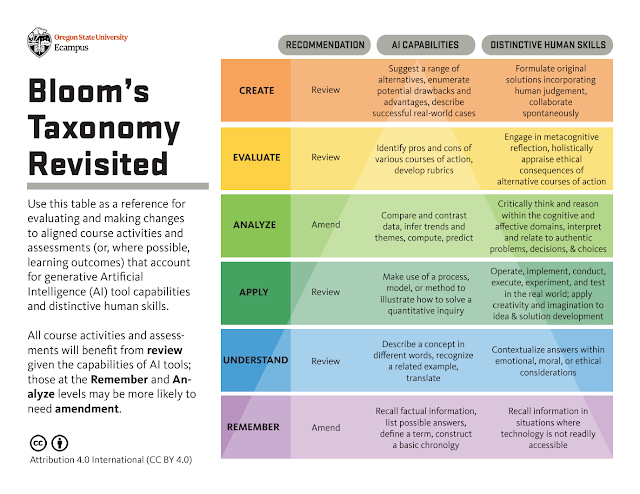
Almost everyone who has taken a course in education has heard of Bloom's Taxonomy. It was created to provide a common language for teachers to discuss learning and assessment methods. Bloom's Taxonomy is an ordering of an individuals' cognitive skills in order to help students and teachers in the classroom. The levels move from remember being the lowest level to creating being the highest level. The levels in Bloom's Taxonomy in order from lowest to highest are: remember, understand, apply, analyze, evaluate and create.

In our new world, with generative AI everywhere, Bloom's Taxonomy has been revisited by Oregon State University, to include information for each level pertaining to AI capabilities and distinctive human skills. Review the information yourself in the link below.
Tuesday, March 19, 2024
A Guide for Elementary Teachers
The last Guide in the ISTE series is Hands-On Project Guides for use in the classroom, A Guide for Elementary Teachers.
You can find this Guide on the ISTE website or by following this link: https://bit.ly/3xRLPGO.
The introduction and the appendices contain a little bit of information about AI and how to use the Guide. The Guide itself contains 4 different projects that you can use with students in Secondary classes, grades K-5, to help guide their thinking about AI.
Tuesday, March 12, 2024
A Guide for Secondary Teachers
As previously mentioned, ISTE offers a series of Hands-On Project Guides for use in the classroom. This week I want to highlight A Guide for Secondary Teachers.
You can find this Guide on the ISTE website or by following this link: https://bit.ly/44ngeZJ.
The introduction and the appendices contain a little bit of information about AI and how to use the Guide. The Guide itself contains 4 different projects that you can use with students in Secondary classes, grades 6–12, to help guide their thinking about AI.
Tuesday, March 5, 2024
A Guide for Electives Teachers
ISTE offers a series of Hands-On Project Guides for use in the classroom. This week I want to highlight A Guide for Elective Teachers.
You can find this Guide on the ISTE website or by following this link: https://adobe.ly/3PJD2Nh.
The introduction and the appendices contain a little bit of information about AI and how to use the Guide. The Guide itself contains 4 different projects that you can use with students in Electives classes, to help guide their thinking about AI.
Tuesday, February 27, 2024
A Guide for Computer Science Teachers
ISTE offers a series of Hands-On Project Guides for use in the classroom. This week I want to highlight A Guide for Computer Science Teachers.
You can find this Guide on the ISTE website or by following this link: https://adobe.ly/4a8tvHZ.
The introduction and the appendices contain a little bit of information about AI and how to use the Guide. The Guide itself contains 4 different projects that you can do with students to help guide their thinking about Computer Science and how AI is already or can be used.
Tuesday, February 20, 2024
A Guide on Ethics and AI
As I mentioned last week, ISTE offers a series of Hands-On Project Guides for use in the classroom. This week I want to highlight A Guide on Ethics and AI.
You can find this Guide on the ISTE website or by following this link: https://adobe.ly/49dbpTN.
The introduction and the appendices contain a little bit of information about AI and how to use the Guide. The Guide itself contains 4 different projects that you can do with students to help guide their thinking about ethics and using AI ethically.
Tuesday, January 23, 2024
World Read Aloud Day

World Read Aloud Day is a day dedicated to the art of reading aloud. It is celebrated on the first Wednesday in February. Multiple vendors and book companies provide a variety of activities to celebrate. Mark your calendars for February 7th, 2024, and get ready for a day full of excitement as we celebrate the joy of reading aloud.
One of the great companies that will be participating in World Read Aloud Day is Curipod! They will have a new author every 30 minutes, including a live Q & A session with each author. Each registered classroom will get a 70-page activity packet from Curipod. The packet includes amazing interactive, engaging lesson plans and activities, downloadable activity books, coloring pages, turnkey Curipod lessons, Genially activities and so much more!
Don't miss out on this incredible opportunity! Register your classroom now to ensure you and your students don't miss out on the literary adventure of a lifetime. Even if you can't attend, registering to receive the student activity guide is worth it!
Register with Curipod for WRADLive at https://wradlive.com/.
Tuesday, May 9, 2023
Adding and Editing an Image in a Google Drawing
Last week I talked about adding text to a Google Drawing to make pamphlets, flyers, newsletters or even posters.
When creating these projects you will most likely also want to add images. The link below will take you to a tutorial on how to add and edit images in a Google Drawing.
Tuesday, May 2, 2023
Adding and Editing Text in a Google Drawing
Although it is not the most robust tool on the market, Google Drawings can be used to create a variety of desktop publishing needs. Google Drawings can be used to create pamphlets, flyers, newsletters or even posters.
To create these projects you will want to start with adding text. The link below will take you to a tutorial on how to add and edit text in a Google Drawing.
Adding and Editing Text in Google Drawing (https://bit.ly/42KvlKB)
Tuesday, April 18, 2023
Pear Deck in Google Slides
Although Google Slides is a great way to add interest to a lecture or presentation, it can get monotonous or boring at times. Making a presentation more engaging and interactive is the best way to keep everyone's attention.
One way to make a Slides presentation more engaging and interactive is to use the Pear Deck Add-On for Google Slides (https://bit.ly/3CzccR2). Pear Deck allows everyone to have a voice and choice when answering questions, lets you see the slides show on an individual device so that you can follow along more easily, and allows teachers to do quick formative assessments to check for understanding.
To add the Pear Deck Add-On to Google Slides follow the instructions in the tutorial attached below.
Google: Install and Use Add-Ons
(https://bit.ly/38on9XO)
Tuesday, March 7, 2023
Promoting STEM Through Literature
REMC has another great resource that I would like to highlight this week:
Promoting STEM Through Literature
Literature can be a great way to get students excited about science, technology, engineering, and math (STEM). Educators can use literature to get students actively involved in the design thinking process.
Each of the title shared on the website has a book card/lesson plan that includes a maker-STEM connection; pre, during, and post questions; and a design challenge that incorporates materials you could check out from your local REMC library. You can also check out each of the books from your local REMC library.
This year there will be 3 new books announced at the MACUL conference in Detroit, in March.
Tuesday, May 24, 2022
Visual Recipes
Are you looking for a fun, end of the year activity to do with your students?
Have you thought about cooking with your class?
Everyone can create delicious food with picture recipes. Picture recipes are great for all ages and abilities because they don't rely on reading abilities.
Check out these great recipe options from Able2Learn: https://able2learn.com/categories/visual-recipes
Tuesday, April 5, 2022
Assignment Calculator
Are you looking for a way to help your students manage his/her time with a big writing project?
The University of Minnesota has created an Assignment Calculator (https://www.lib.umn.edu/services/ac) that helps break down large writing projects into manageable chunks. You can set a timeline for a research paper, speech or lab report.
The timeline provided is broken down into small, daily steps. The timeline of steps can even be added into your Google Calendar to help you stay on track.
The University of Minnesota has created an Assignment Calculator (https://www.lib.umn.edu/services/ac) that helps break down large writing projects into manageable chunks. You can set a timeline for a research paper, speech or lab report.
The timeline provided is broken down into small, daily steps. The timeline of steps can even be added into your Google Calendar to help you stay on track.
Tuesday, October 26, 2021
OneTab
Some Google Extensions are great tools for productivity and organization. One Extension that can be very helpful is OneTab.
OneTab
One Tab allows you to convert all of your open tabs into a list of URLs.

From the list you can restore your tabs individually or all at once.

Using OneTab can conserve battery power on a laptop/Chromebook. It can also help speed up your device. OneTab temporarily reduces the amount of memory your computer or chromebook uses, when you keep too many tabs running in the background.
The URL list can also be exported to save for later or to be shared with someone.

OneTab may be just the tool your students need when they are working on a research paper for your class. They can open and view multiple tabs. When computer time is over, they send the OneTab list to their G-Mail for later review and use. They will have all of their research available to them, without having to continually start over or remember what they had searched for previously.
Tuesday, December 17, 2019
Plagiarism Checker
I have been working with a student that attends classes at a local university. His teacher consultant, a colleague and friend of mine, was doing some research on free plagiarism checkers to use with her students when she discovered Free Online Plagiarism Checker Tool by Publi6 (https://freeplagiarismchecker.pro/en).
Students can use plagiarism detection software to check completed class work, essays or research assignments. Students can face penalties for plagiarism, including failing an assignment, being put on academic probation, or even face expulsion at some colleges and universities. Students should be aware that even unintentional plagiarism can be viewed as plagiarism and may be dealt with accordingly.
If you have students working on writing assignments or research projects, make sure they check for plagiarism before they turn it in for grading.
Subscribe to:
Posts (Atom)