BigReveal is an iPad app that lets you create personalized scratch cards. You use the app to hide a picture under a silver coating, just like a scratch-off lottery ticket.
This app can be highly motivating to students. For teacher and staff, it can help evaluate how well students can swipe up, down, right or left and if they can access all areas of the screen, which can be helpful when trying out a new stylus or mouse.
This app is not free, but only cost $1.99. It might be a good investment for use with your students.
Tuesday, March 15, 2022

Tuesday, March 8, 2022
Visor
Visor (https://bit.ly/3KVq0b7) is a Google Chrome extension that is a screen dimmer and reading aid. Visor may also help with fluency, eye-strain, concentration and comprehension whilst reading.
Visor offers overlays and point of focus features that may assist users with visual perceptual difficulties such as Dyslexia, Scotopic Sensitivity Syndrome and Visual Stress.
Visor offers overlays and point of focus features that may assist users with visual perceptual difficulties such as Dyslexia, Scotopic Sensitivity Syndrome and Visual Stress.
Visor also uses a point of focus feature, designed to help further reduce visual confusions and the tendency to skip lines. Visors horizontal focal point tracks your mouse, giving you full focus to the content being read, while reducing the visual noise of the surrounding page.
Tuesday, March 1, 2022
OpenSymbols
Are you looking for free picture symbols to use in your classroom?
OpenSymbols (https://www.opensymbols.org/) is a collection of creative commons picture symbols that can be used for augmentative communication. The collection pulls from multiple sources and currently includes access to more than 50,000 symbols and icons!
Tuesday, February 22, 2022
whiteboard.chat
Would you like to collaborate with your students, using an online whiteboard?
Whiteboard.chat is a free interactive online whiteboard for teachers and students to collaborate digitally. You can easily observe all of your students, on individual whiteboards or demonstrate something to the whole class on a single board.
Although it is free for educators, there are some limitations. You can have up to 10 class boards. If you don't touch a board for 7 days, it will be deleted.
Whether you are creating individual student boards or one class board, inviting student is as easy as sharing the board specific code.
Although it takes a little exploring to figure out how to navigate at first, there are some really COOL features in whiteboard.chat!
Do you want to show your kids how to break down money, give change?
Open a new board.
On the right open Gizmos:

In the menu find US Currency:
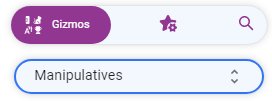

Add some different denominations of money to the board.
On the left go to Tools, Break Down:

With the crosshairs, click on any of the bills or coins (larger than a penny) you added!
Tuesday, February 15, 2022
Pattern Shapes
Pattern Shapes helps students explore geometry. It helps students think about angles, investigate symmetry, and compose and decompose larger shapes.
Pattern Shapes is a virtual version of the 7 familiar classroom shapes: yellow hexagons, orange squares, green triangles, red trapezoids, blue parallelograms, and tan rhombuses.
Check out their great tutorials (https://bit.ly/36kEF0i).
 Number Line is available as a web app (https://bit.ly/3IrYdNA), for iOS (https://apple.co/3ubFUqN), or for Chrome (https://bit.ly/3N1vMt8).
Pattern Shapes is a virtual version of the 7 familiar classroom shapes: yellow hexagons, orange squares, green triangles, red trapezoids, blue parallelograms, and tan rhombuses.
Check out their great tutorials (https://bit.ly/36kEF0i).
Tuesday, February 8, 2022
Money Pieces
Money Pieces helps students visualize and understand its values and relationships. There are two versions of coins and bills in the app. The currency pieces mimick the appearance and size of U.S. coins and the dollar bill.
Check out their great tutorials (https://bit.ly/3uyacG2).
 Money Pieces is available as a web link (https://bit.ly/3gtgGxt), iOS app (https://apple.co/3uBxXNh), or for Google Chrome (https://bit.ly/3GAbbI6).
Check out their great tutorials (https://bit.ly/3uyacG2).
Tuesday, February 1, 2022
Math Vocabulary Cards
Math Vocabulary Cards helps students better understand key terms in mathematics. Each card has three sections: a math term, a model, and an easy to understand definition. Each section can be hidden or revealed, providing multiple options for practice. Vocabulary cards can be selected one by one or by category. They are available in both English and Spanish.
 Math Vocabulary Cards is available as a web app
 (https://bit.ly/3uqP4kG), for iOS
(https://apple.co/3L2l0Sw), or for Chrome
(https://bit.ly/34aeLeO).
Subscribe to:
Posts (Atom)