Tuesday, July 25, 2017

Doc Tools, a Google Add-On for Google Docs

Doc Tools is a set of single-click tools that let you perform a number of varied actions while working in your text.


You can perform a few "quick" actions from the drop down by highlighting the text and selecting a feature:

- Arrange your table rows or list items in ascending or descending alphabetical order. 
- Convert numbers to words or vice versa
- Quickly change the case of your words, in multiple different formats:
     - change it to all uppercase or lowercase 
     - capitalize each word
     - capitalize each sentence 
     - toggle case 


Or, you can have a side bar of actions by selecting Start from the drop down:
- Increase and Decrease font until you find the right size
- Highlight important information
- Arrange your table rows or list items in ascending or descending alphabetical order. 
- Convert numbers to words or vice versa
- Quickly change the case of your words, in multiple different formats: 
     - change it to all uppercase or lowercase 
     - capitalize each word
     - capitalize each sentence 
     - toggle case 


Tuesday, July 18, 2017

formLimiter

formLimiter lets you automatically set Google Forms to stop accepting responses after a maximum number of responses has been reached or at a specific date and time.  This add-on is great for time-based assignments or for registrations with limited seats or availability.






It is easy to setup.  Simply launch the add-on, set the limit type, and save.

The Limit types are:

  • Specific date and time
    • Timer will shut off form on the specified date and time, down to the minute.
  • Maximum number of responses
    • Form shuts off once the set limit has been reached. 


Tuesday, July 11, 2017

Google Forms Notifications

I love Google Forms!  It is great for quizzes or surveys.  It is great for quick responses from students and staff.  I don't love that I have to check it all the time to see if anyone has responded.  Until now...

Google Forms has made a recent update.  You can get notifications when someone fills out the form, directly to your e-mail, no add-on required.

Within the Form, go to the Responses tab.  Open the 3 dots.  Select, "Get email notifications for new responses".


Quick, easy, Wonderful!!

Thursday, July 6, 2017

Happy 4th of July

My apologies bloggers.

I did not get a blog post written before the holiday and have had very limited time this week.  

I hope everyone was able to enjoy Independence Day, some fireworks, and maybe a picnic.

Type Fireworks into the ChromeWeb Store and check out some of the themes that are available.

Tuesday, June 27, 2017

How to Find: Google Add-ons

In comparison to Microsoft Office, the Google Suite of apps has always been considered less powerful. Google has been adding features into their software to make it more compatible to Microsoft. Some of these features are available though what Google calls Add-ons.

Google Add-ons are items that enhance the functioning of the Google Docs, Sheets, and Forms.  
Add-ons are created by developers to give you features similar to Microsoft Office.

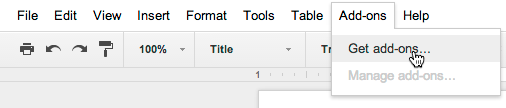
To browse through add-ons for Docs, Sheets and Forms, select Get add-ons in the Add-ons menu of any open Doc, Sheet or Form.


Once you install an add-on it will become available across all of your Docs, Sheets and Forms and you can start using it right away.


Follow my posts this summer as I explore some great Add-ons for Google Docs, Sheets and Forms.

Tuesday, June 20, 2017

BeeLine Reader

Do you have students that struggle with tracking? Is reading online articles nearly impossible for them because of there tracking struggles?

BeeLine Reader may the perfect solution.


BeeLine Reader creates a more readable version of a web page. It starts by removing all of the ads and other distracting items. It provides a second layer by applying gradient coloring to help guide your eyes from left to right and from one line to the next. 


BeeLine Reader is available for up to 5 articles per day for free.  It also offers the OpenDyslexic font with just the slide of a switch.


Tuesday, June 13, 2017

Cite this for Me: Web Citer

With all of the information that can be found on the internet these days, it is sometimes hard to know how to cite an online article.  Additionally, with all of the different citation formats, it is sometimes hard to remember how they are all formatted.
Try Cite this for Me: Web Citer

With the Cite this for Me Google extension you can automatically create website citations in APA, MLA, Chicago, or Harvard referencing styles.

Cite this for Me will generate a correctly formatted citation that you can copy and paste into your assignment.  You can also crate an online bibliography for later use at http://www.citethisforme.com/.