Tuesday, March 21, 2017

Plickers

Many schools are not a 1:1 device environment.  Most schools do not have a whole classroom set of iPads, laptops or desktops even.  This makes it difficult to do quick, whole class, electronic assessments.  


Enter Plickers!


Plickers is a set of cards that can be used to provide real-time formative assessment data within your limited tech environment.  Plickers can be used for quizzes, entrance/exit tickets or to quickly check for understanding during a lesson.  They can be used in any classroom setting including math, art or physical education.  Plickers provides a chance for all students to engage in learning without feeling self-conscious.  
    
Plickers is easy to setup and use.  Teachers need a computer, projector, tablet or smartphone and a wifi signal.  Students need a paper Plickers card.  
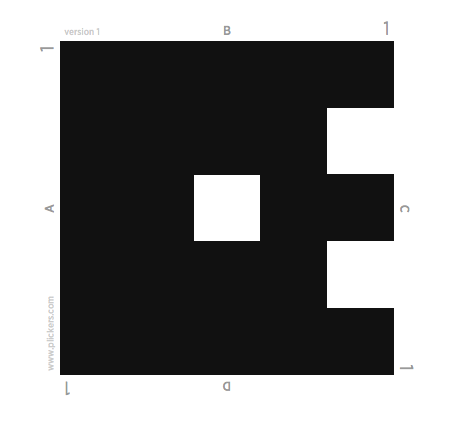
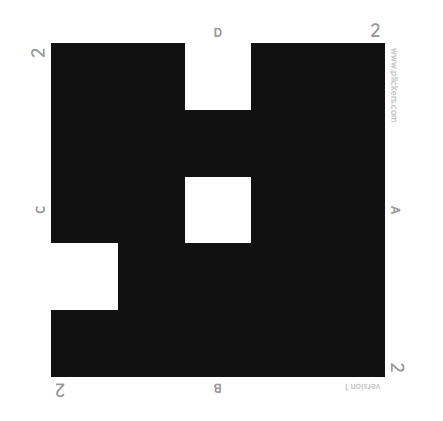
Each Plicker card is a unique visual code.  The code has 4 sides, each lettered A, B, C, and D.  The student holds the card so that the letter they choose to answer is at the top of their card.  Teachers gather the answers instantly, using the Plickers app on a wireless device.  Scan the room.  You have just collected the answer to a question and can tell exactly which student got it correct and which student needs additional help in this area.  


With a little bit of set up and planning you have a quick interactive way to check for knowledge and receive real time information from your class.  


I found a great YouTube tutorial for setting up and using Plickers.  It contains step by step information and great tips and suggestions, all in under 9 minutes.  


Get your set of Plicker cards today!  
To get the app follow the links for the App Store or Google Play here.  
For additional information, check out the FAQ’s page or the Help page on the Plickers site.  

For great ideas and inspiration you can also follow Plickers on Twitter or check out additional YouTube videos.  

Tuesday, March 14, 2017

Dyslexic Font


Do you have Dyslexia?  Your brain can sometimes do funny things to letters.
OpenDyslexic tries to help prevent some of these things from happening. The letters in the OpenDyslexic font have heavy weighted bottoms to add "gravity" to each letter. The weighted letters help you quickly figure out which part of the letter is down. It can help keep your brain from rotating letters. Consistently weighted bottoms can also help prevent line jumping while reading. The unique shapes of each letter has been proven to help prevent confusion through flipping and swapping.


Tuesday, March 7, 2017

FlashTabs

Have you ever struggled with studying for a test or learning a new language?  Are the struggles even more difficult when you factor in keeping up with your day to day responsibilities?

The FlashTabs extension for Google Chrome might be just what you need.


FlashTabs enables you to create a deck of flash cards and cycle through them each time you open a new tab in Google Chrome.  This feature provides you with the opportunity to study as you go about your daily tasks.


Tuesday, February 28, 2017

Color Enhancer

Color Enhancer is a Google Extension for people who are partially color-blind.  This tool can help adjust and improve webpage colors.


Color Enhancer is a customizable color filter applied to webpages to improve color perception.  


Tuesday, February 21, 2017

Flubaroo - for teachers, not students

The ability to use Google Forms to create multiple choice assignments or short answer quizzes and tests is a great tool.  You create the assignment and the results come to you in a Google Sheet.  This is a great way to grade and create graphs to compare data.  Imagine if grading this was even faster and easier. 

Flubaroo


Flubaroo can quickly grade and analyze performance on multiple choice questions and fill in assignments automatically!  

Within a minute you'll be able to: 
  • Get scores for each student
  • Identify students in need of extra help. 
  • View the average score and a histogram of scores. 
  • Quickly identify questions which a majority of the students missed. 
  • Share scores with students via email or Google Drive
  • Add optional notes to the class and/or to each student. 
  • Assign your own score to open-ended questions. 
  • Send stickers and badges when you share grades. 

If you are already using Google Forms to create assignments you must get Flubaroo to help with your grading!

Tuesday, February 14, 2017

Teaching Children from Poverty and Trauma

A few months ago at one of our district PDs, the Special Education staff got to listen to a presentation on Trauma and how it affects students brains.  It was a very eye-opening presentation.  

This month the NEA Today Magazine cover article is Trauma: The Effect on Children and Learning.  

Now, I don't usually read the NEA Today Magazine and truth be told, I did find the information a bit skewed.  That being said, it was a good article and it gave a good introduction and some insight into a much larger issue.  

At the end of the article there is a link that takes you to a Handbook called: Teaching Children from Poverty and Trauma.  It is a resource of information to help students struggling with Trauma.   

I hope you find this information as helpful and informative as I have.  Please use this as a starting point towards a better understanding of this ever increasing concern within our student population.  

Tuesday, February 7, 2017

ATbar

Color overlays can help students with Dyslexia. Sometimes people with light sensitivity can be helped by switching reading items to 'white on black'. Certain individuals need the font size increased to be able to read. Having an article read out-loud can help some students understand it better. All of these concerns can be addressed with one Google Extension.

ATbar


The concept behind ATbar is simple, one toolbar to provide all of the features you would usually achieve through the use of different settings or products.

ATbar is an Accessibility toolbar. It has options available to work within most webpages.  It is a simple tool and is available for most popular browsers. View the available options at https://www.atbar.org/download/.


ATbar offers a large number of Voice options.


The color overlay options in ATbar have been proven to be the optimal colors to improve readability for people with Dyslexia.