Hello Bloggers! Summer for our technology department is a busy time and this sure has been a busy summer. I am sorry for the late post today.
Inverting colors or using gray scale can be a very helpful tool for students with vision issues. It can be helpful for students with light sensitivity or who are color blind.
Setting up these two different options are available within the Accessibility Features on your computer. As a primarily Mac district here is a Mac tutorial on how to make the changes, to Invert Colors or use Gray Scale.
Tuesday, August 15, 2017

Tuesday, August 8, 2017
EasyBib
In a previous Blog post I discussed Cite this for Me: Web Citer, a Google Extension. Another options to help with creating a bibliography would be EasyBib!
EasyBib is a Google Docs add-on that allows you to create a bibliography, automatically. You can cite books, journal articles and websites simply by entering the title or URL.
This add-on lets you format in MLA, APA, Chicago, Harvard, and over 7K other styles. When you have finished adding your sources, EasyBib will generate your bibliography, alphabetize your citations and add them to the end of your paper, with just a couple of mouse clicks.


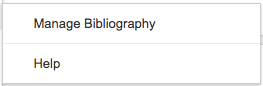
Select Manage Bibliography from the drop-down and begin filling in the information in the sidebar.
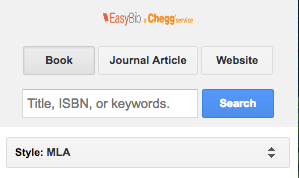
EasyBib is a Google Docs add-on that allows you to create a bibliography, automatically. You can cite books, journal articles and websites simply by entering the title or URL.
This add-on lets you format in MLA, APA, Chicago, Harvard, and over 7K other styles. When you have finished adding your sources, EasyBib will generate your bibliography, alphabetize your citations and add them to the end of your paper, with just a couple of mouse clicks.


Select Manage Bibliography from the drop-down and begin filling in the information in the sidebar.

Tuesday, August 1, 2017
Google Docs add-on Highlight Tool
This add-on lets you highlight text directly in a Google Doc, using a convenient sidebar. Any information that opens as a Google Doc, or can be opened as a Google Doc, can use the Highlight Tool.
Open the sidebar by choosing "Highlight Tool > Start". Then create highlighters and use them to highlight selected text.


Highlights can be named by the color you are using or by the function of each different color (e.g. noun, verb, adj. or topic sentence, supporting fact, conclusion).
Open the sidebar by choosing "Highlight Tool > Start". Then create highlighters and use them to highlight selected text.

Highlights can be named by the color you are using or by the function of each different color (e.g. noun, verb, adj. or topic sentence, supporting fact, conclusion).


Tuesday, July 25, 2017
Doc Tools, a Google Add-On for Google Docs
Doc Tools is a set of single-click tools that let you perform a number of varied actions while working in your text.
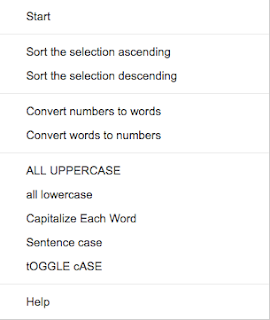
You can perform a few "quick" actions from the drop down by highlighting the text and selecting a feature:
- Arrange your table rows or list items in ascending or descending alphabetical order.
- Convert numbers to words or vice versa
- capitalize each sentence
- toggle case

- Highlight important information
- change it to all uppercase or lowercase
- capitalize each word
- capitalize each sentence
- toggle case

You can perform a few "quick" actions from the drop down by highlighting the text and selecting a feature:
- Arrange your table rows or list items in ascending or descending alphabetical order.
- Convert numbers to words or vice versa
- Quickly change the case of your words, in multiple different formats:
- change it to all uppercase or lowercase
- capitalize each word- capitalize each sentence
- toggle case

Or, you can have a side bar of actions by selecting Start from the drop down:
- Increase and Decrease font until you find the right size- Highlight important information
- Arrange your table rows or list items in ascending or descending alphabetical order.
- Convert numbers to words or vice versa
- Quickly change the case of your words, in multiple different formats: - change it to all uppercase or lowercase
- capitalize each word
- capitalize each sentence
- toggle case
Tuesday, July 18, 2017
formLimiter
 formLimiter lets you automatically set Google Forms to stop accepting responses after a maximum number of responses has been reached or at a specific date and time.
 This add-on is great for time-based assignments or for registrations with limited seats or availability.
It is easy to setup. Simply launch the add-on, set the limit type, and save.
The Limit types are:
- Specific date and time
- Timer will shut off form on the specified date and time, down to the minute.
- Maximum number of responses
- Form shuts off once the set limit has been reached.


Tuesday, July 11, 2017
Google Forms Notifications
I love Google Forms! It is great for quizzes or surveys. It is great for quick responses from students and staff. I don't love that I have to check it all the time to see if anyone has responded. Until now...
Google Forms has made a recent update. You can get notifications when someone fills out the form, directly to your e-mail, no add-on required.
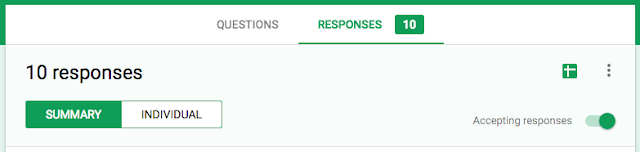
Within the Form, go to the Responses tab. Open the 3 dots. Select, "Get email notifications for new responses".

Quick, easy, Wonderful!!
Google Forms has made a recent update. You can get notifications when someone fills out the form, directly to your e-mail, no add-on required.
Within the Form, go to the Responses tab. Open the 3 dots. Select, "Get email notifications for new responses".


Quick, easy, Wonderful!!
Thursday, July 6, 2017
Happy 4th of July
My apologies bloggers.
I did not get a blog post written before the holiday and have had very limited time this week.
I hope everyone was able to enjoy Independence Day, some fireworks, and maybe a picnic.
Type Fireworks into the ChromeWeb Store and check out some of the themes that are available.
I did not get a blog post written before the holiday and have had very limited time this week.
I hope everyone was able to enjoy Independence Day, some fireworks, and maybe a picnic.
Type Fireworks into the ChromeWeb Store and check out some of the themes that are available.
Subscribe to:
Posts (Atom)